Personal Defender 2009
Posted: October 31, 2008
Threat Metric
The following fields listed on the Threat Meter containing a specific value, are explained in detail below:
Threat Level: The threat level scale goes from 1 to 10 where 10 is the highest level of severity and 1 is the lowest level of severity. Each specific level is relative to the threat's consistent assessed behaviors collected from SpyHunter's risk assessment model.
Detection Count: The collective number of confirmed and suspected cases of a particular malware threat. The detection count is calculated from infected PCs retrieved from diagnostic and scan log reports generated by SpyHunter.
Volume Count: Similar to the detection count, the Volume Count is specifically based on the number of confirmed and suspected threats infecting systems on a daily basis. High volume counts usually represent a popular threat but may or may not have infected a large number of systems. High detection count threats could lay dormant and have a low volume count. Criteria for Volume Count is relative to a daily detection count.
Trend Path: The Trend Path, utilizing an up arrow, down arrow or equal symbol, represents the level of recent movement of a particular threat. Up arrows represent an increase, down arrows represent a decline and the equal symbol represent no change to a threat's recent movement.
% Impact (Last 7 Days): This demonstrates a 7-day period change in the frequency of a malware threat infecting PCs. The percentage impact correlates directly to the current Trend Path to determine a rise or decline in the percentage.
| Threat Level: | 10/10 |
|---|---|
| Infected PCs: | 67 |
| First Seen: | July 24, 2009 |
|---|---|
| OS(es) Affected: | Windows |
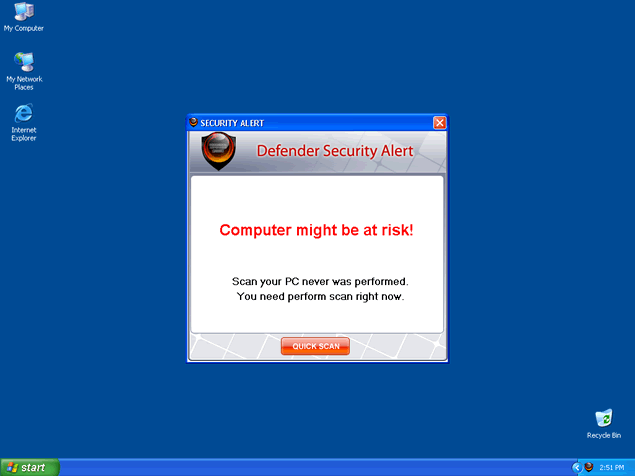
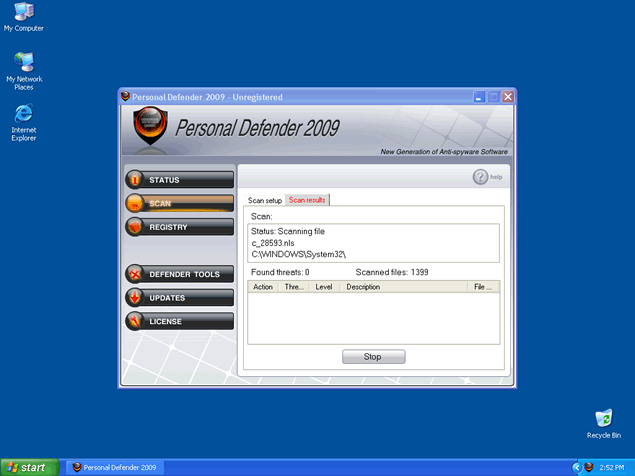 Personal Defender 2009, or PersonalDefender 2009, is a rogue anti-spyware program that appears on your computer with the help of a Trojan found bundled in a filename called mupd1_2_1711951.exe. The filename mupd1_2_1711951.exe executes fake alert messages that imitate a Windows Firewall notification. The fake Windows Firewall notification states that the Trojan-Keylogger.WIN32.Fung has been found on your computer and suggests if you want to enable protection. If you click on the "Enable Protection" button, you will be directed to a page where you are advised to download and install Personal Defender 2009. The fake Windows Firewall notification may cease, if you locate the mupd1_2_1711951.exe file and delete it.
Once Personal Defender 2009 infiltrates your system, it may start to annoy you repeatedly with even more popups or system alert messages used as scare tactics. Personal Defender 2009 ultimate goal is to scare you into purchasing a full version of the Personal Defender 2009 program.
Personal Defender 2009 does not live up to its expectations as it is not really capable of removing parasites or viruses. Personal Defender 2009 may also hijack your browser and redirect it to personaldefender2009.com.
Personal Defender 2009 should not be purchased under any circumstances. If you have Personal Defender 2009 on your system, then it is recommended that you use a dependable anti-spyware program to locate and remove Personal Defender 2009 and its files.
Technical Details
File System Modifications
Tutorials: If you wish to learn how to remove malware components manually, you can read the tutorials on how to find malware, kill unwanted processes, remove malicious DLLs and delete other harmful files. Always be sure to back up your PC before making any changes.
The following files were created in the system:mupd1_2_1165664.exe
File name: mupd1_2_1165664.exeSize: 98.3 KB (98304 bytes)
MD5: e05c64b0fc2610fa1d4809785ebe81aa
Detection count: 64
File type: Executable File
Mime Type: unknown/exe
Group: Malware file
Last Updated: December 11, 2009
personaldefender2009[1].exe
File name: personaldefender2009[1].exeSize: 7.52 MB (7524864 bytes)
MD5: bf50e2bd724553a6d49b504879b6e2e3
Detection count: 49
File type: Executable File
Mime Type: unknown/exe
Group: Malware file
Last Updated: December 11, 2009
pdefendr.exe
File name: pdefendr.exeSize: 2.99 MB (2990080 bytes)
MD5: b05f51c7b22a13fd302131bfeca0b63a
Detection count: 46
File type: Executable File
Mime Type: unknown/exe
Group: Malware file
Last Updated: December 11, 2009
I had this fake security pop up on my computer and it still is but because of this site I didn't insall the program! Good thing. But I still can't get that stupid window from popping up all the time!
I discovered a new variant tonight on a friend’s machine. Looking in the registry, it referred to an apparently random directory name in the user profile. The EXE also appeared to have a short random alphabetic name. Malwarebytes said it removed it, but it came right back on the next reboot. I dug into the registry and ripped out the keys, and found and deleted the files.
After removing it and rebooting, the infection appeared to be gone, but IE wouldn’t display any web pages, although the internet would connect and there was data traffic. The reason it wouldn’t display any web pages was that the browser connection settings had been modified to point to a proxy server at 127.0.0.1, which I believe means that a web server had been installed on the computer and was intended to act as a proxy for all web pages, possibly scanning them for important information such as userid’s and passwords and then sending that information to a remote recipient. I don’t know if the web server was installed to a different location from the Personal Defender EXE; it is possible that it was, because I could see traffic even though there were no programs that I knew of that were using the web, even in the background. Possibly the configuration was faulty and the web server didn’t function properly, and this is why I noticed it. I believe that IF it functioned correctly, then I would have believed the infection was gone, while a very insidious part of it remained, silently siphoning off userid’s and passwords for websites.
After you have cleaned up the infection, be sure to check your browser’s connection settings and verify that it does not point to a proxy server at 127.0.0.1, using port 5555. I could disable this usage of the proxy server, but I couldn't convince myself that there still wasn't a rouge web server installed somewhere on the PC functioning and active, as I could see a lot of network traffic when there should have been none.
To clear up this part of the infection I used a system restore point to two days prior.
Good luck with particularly nasty infection.