Activate Ultimate Protection
Posted: May 25, 2012
Threat Metric
The following fields listed on the Threat Meter containing a specific value, are explained in detail below:
Threat Level: The threat level scale goes from 1 to 10 where 10 is the highest level of severity and 1 is the lowest level of severity. Each specific level is relative to the threat's consistent assessed behaviors collected from SpyHunter's risk assessment model.
Detection Count: The collective number of confirmed and suspected cases of a particular malware threat. The detection count is calculated from infected PCs retrieved from diagnostic and scan log reports generated by SpyHunter.
Volume Count: Similar to the detection count, the Volume Count is specifically based on the number of confirmed and suspected threats infecting systems on a daily basis. High volume counts usually represent a popular threat but may or may not have infected a large number of systems. High detection count threats could lay dormant and have a low volume count. Criteria for Volume Count is relative to a daily detection count.
Trend Path: The Trend Path, utilizing an up arrow, down arrow or equal symbol, represents the level of recent movement of a particular threat. Up arrows represent an increase, down arrows represent a decline and the equal symbol represent no change to a threat's recent movement.
% Impact (Last 7 Days): This demonstrates a 7-day period change in the frequency of a malware threat infecting PCs. The percentage impact correlates directly to the current Trend Path to determine a rise or decline in the percentage.
| Threat Level: | 2/10 |
|---|---|
| Infected PCs: | 56 |
| First Seen: | May 25, 2012 |
|---|---|
| OS(es) Affected: | Windows |
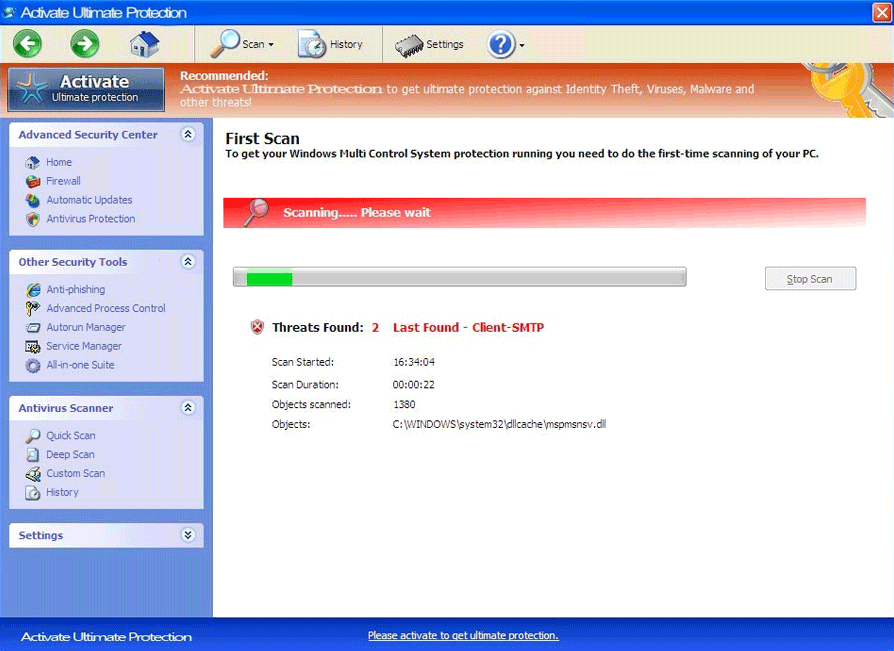 Activate Ultimate Protection is a component of recent versions of rogue anti-malware programs from the Win32/FakeVimes family. Like all components and features of such scamware, Activate Ultimate Protection doesn't have any ability to protect your PC and is always an indication of infection by malicious software. While the most likely danger that's presented by Activate Ultimate Protection itself is being tricked into spending money on its associated scamware, SpywareRemove.com malware researchers have found that other attacks that are also included in common Activate Ultimate Protection-related infections are browser redirects, search engine hijacks, fraudulent pop-up alerts, blocked programs and a litany of other unauthorized changes to Windows. While rogue anti-malware applications that use fake Activate Ultimate Protection features are limited to attacking Windows PCs, they should be considered to be actively-distributing PC threats with ongoing development.
When You Activate Ultimate Protection and Deactivate Your Own Finances in the Process
Because SpywareRemove.com malware research team has found that Activate Ultimate Protection's buttons are always components of rogue AV products, you should be prepared to identify differently-named scamware products by their usage of Activate Ultimate Protection and similar attributes (such as fake 'Advanced Process Control' features that replace Windows Task Manager). Examples of other members of FakeVimes that have been confirmed to use Activate Ultimate Protection buttons in their template include: Privacy Guard Pro, Extra Antivirus, Fast Antivirus 2009, Presto TuneUp, Windows Security Suite, Smart Virus Eliminator, Packed.Generic.245, Volcano Security Suite, Windows Enterprise Suite, Enterprise Suite, Additional Guard, Live PC Care, PC Live Guard, Live Enterprise Suite, Security Antivirus, My Security Wall, CleanUp Antivirus, Smart Security and PrivacyGuard Pro 2.0.
Notably, SpywareRemove.com malware researchers have also seen some occurrences of WIn32/FakeVimes variants that break out of their typical brand-name pattern to include an additional word (such as Windows Pro Safety Release). Older variants of WIn32/FakeVimes have been known to use different naming patterns and aren't guaranteed to include Activate Ultimate Protection buttons (although they will continue to be nearly-identical in most other respects).
The PC threat-defining and most visible attacks from Activate Ultimate Protection-related scamware programs include fraudulent security warnings, system notifications and hard drive scans. Although all security information from an Activate Ultimate Protection-branded program will display fake results that warn you about harmful software or attacks that aren't actually reaching your computer, these FakeVimes variants may also cause real security issues until they're deleted. Activate Ultimate Protection doesn't serve any purpose besides encouraging you to spend money on the fake anti-malware program that Activate Ultimate Protection is attached to, and, as such, should never be interacted with as long as you're interested in saving your money for legitimate software.
How You Can Tell Activate Ultimate Protection to Put a Sock in It
Since there's no reason to 'activate' any software that Activate Ultimate Protection recommends you to purchase, SpywareRemove.com malware researchers encourage you to delete all Activate Ultimate Protection-associated scamware once you begin to see the first indications of fake pop-ups and other symptoms (such as browser redirects or blocked AV software) on your computer. Since the presence of rogue anti-malware scanners from Activate Ultimate Protection's family is always indicative of potentially serious security vulnerabilities, it's suggested that you enact an appropriate solution ASAP to minimize any chance of permanent damage to your operating system.
FakeVimes-based PC threats with Activate Ultimate Protection characteristics are limited to attacking Windows-based operating systems, although similar types of fake security products from other families aren't necessarily restricted to Windows attacks. SpywareRemove.com malware analysts have found that fake software updates (for Flash, media codecs, etc) and fake movie-streaming links are two of the most common methods for Activate Ultimate Protection-associated PC threats to be installed, along with fraudulent online scanners. This installation process often uses a Trojan dropper or Trojan downloader such as Zlob, and any scan to remove Activate Ultimate Protection-related software should also be exacting enough to delete related Trojans.
Technical Details
File System Modifications
Tutorials: If you wish to learn how to remove malware components manually, you can read the tutorials on how to find malware, kill unwanted processes, remove malicious DLLs and delete other harmful files. Always be sure to back up your PC before making any changes.
The following files were created in the system:%AppData%\result.db
File name: %AppData%\result.dbMime Type: unknown/db
Group: Malware file
%AppData%\NPSWF32.dll
File name: %AppData%\NPSWF32.dllFile type: Dynamic link library
Mime Type: unknown/dll
Group: Malware file
%AppData%\Protector-[RANDOM CHARACTERS].exe
File name: %AppData%\Protector-[RANDOM CHARACTERS].exeFile type: Executable File
Mime Type: unknown/exe
Group: Malware file
%AppData%\Activate Ultimate Protection\ScanDisk_.exe
File name: %AppData%\Activate Ultimate Protection\ScanDisk_.exeFile type: Executable File
Mime Type: unknown/exe
Group: Malware file
%AppData%\Microsoft\Internet Explorer\Quick Launch\Activate Ultimate Protection.lnk
File name: %AppData%\Microsoft\Internet Explorer\Quick Launch\Activate Ultimate Protection.lnkFile type: Shortcut
Mime Type: unknown/lnk
Group: Malware file
%AppData%\Activate Ultimate Protection\Instructions.ini
File name: %AppData%\Activate Ultimate Protection\Instructions.iniMime Type: unknown/ini
Group: Malware file
%CommonAppData%\58ef5\SP98c.exe
File name: %CommonAppData%\58ef5\SP98c.exeFile type: Executable File
Mime Type: unknown/exe
Group: Malware file
%CommonAppData%\58ef5\SPT.ico
File name: %CommonAppData%\58ef5\SPT.icoMime Type: unknown/ico
Group: Malware file
%CommonAppData%\SPUPCZPDET\SPABOIJT.cfg
File name: %CommonAppData%\SPUPCZPDET\SPABOIJT.cfgMime Type: unknown/cfg
Group: Malware file
%Desktop%\Activate Ultimate Protection.lnk
File name: %Desktop%\Activate Ultimate Protection.lnkFile type: Shortcut
Mime Type: unknown/lnk
Group: Malware file
%Programs%\Activate Ultimate Protection.lnk
File name: %Programs%\Activate Ultimate Protection.lnkFile type: Shortcut
Mime Type: unknown/lnk
Group: Malware file
%StartMenu%\Activate Ultimate Protection.lnk
File name: %StartMenu%\Activate Ultimate Protection.lnkFile type: Shortcut
Mime Type: unknown/lnk
Group: Malware file
Registry Modifications
HKEY..\..\{CLSID Path}HKEY_LOCAL_MACHINE\SOFTWARE\Classes\CLSID\{3F2BBC05-40DF-11D2-9455-00104BC936FF}HKEY_LOCAL_MACHINE\SOFTWARE\Classes\CLSID\{3F2BBC05-40DF-11D2-9455-00104BC936FF}\ Implements DocHostUIHandlerHKEY_LOCAL_MACHINE\SOFTWARE\Classes\CLSID\{3F2BBC05-40DF-11D2-9455-00104BC936FF}\LocalServer32HKEY_LOCAL_MACHINE\SOFTWARE\Classes\CLSID\{3F2BBC05-40DF-11D2-9455-00104BC936FF}\LocalServer32\ [unknown dir]\[unknown file name].exeHKEY_LOCAL_MACHINE\SOFTWARE\Classes\CLSID\{3F2BBC05-40DF-11D2-9455-00104BC936FF}\ProgIDHKEY_LOCAL_MACHINE\SOFTWARE\Classes\CLSID\{3F2BBC05-40DF-11D2-9455-00104BC936FF}\ProgID\ [unknown file name].DocHostUIHandlerHKEY_LOCAL_MACHINE\SOFTWARE\Classes\Dumped_.DocHostUIHandler\Clsid\ {3F2BBC05-40DF-11D2-9455-00104BC936FF}HKEY..\..\..\..{Subkeys}HKEY_CURRENT_USER\Software\Microsoft\Windows\CurrentVersion\Uninstall\Activate Ultimate Protection\InstallLocation [unknown dir]HKEY_CURRENT_USER\Software\Microsoft\Windows\CurrentVersion\Uninstall\Activate Ultimate Protection\Publisher UIS Inc.HKEY_CURRENT_USER\Software\Microsoft\Windows\CurrentVersion\Uninstall\Activate Ultimate Protection\UninstallString “[unknown dir]\[unknown file name].exe” /delHKEY_CURRENT_USER\Software\Microsoft\Windows\CurrentVersion\Uninstall\Activate Ultimate Protection\DisplayIcon [unknown dir]\[unknown file name].exe,0HKEY_CURRENT_USER\Software\Microsoft\Windows\CurrentVersion\Uninstall\Activate Ultimate Protection\DisplayName Activate Ultimate ProtectionHKEY_CURRENT_USER\Software\Microsoft\Windows\CurrentVersion\Uninstall\Activate Ultimate Protection\DisplayVersion 1.1.0.1010HKEY_CURRENT_USER\Software\Microsoft\Windows\CurrentVersion\Run\Activate Ultimate Protection “%CommonAppData%\58ef5\SP98c.exe” /s /dHKEY_CURRENT_USER\Software\Microsoft\Windows\CurrentVersion\UninstallHKEY_CURRENT_USER\Software\Microsoft\Windows\CurrentVersion\Uninstall\Activate Ultimate ProtectionHKEY_LOCAL_MACHINE\SOFTWARE\Microsoft\Tracing\FWCFGHKEY_LOCAL_MACHINE\SOFTWARE\Microsoft\Tracing\FWCFG\ConsoleTracingMask -65536HKEY_LOCAL_MACHINE\SOFTWARE\Microsoft\Tracing\FWCFG\EnableConsoleTracing 0HKEY_LOCAL_MACHINE\SOFTWARE\Microsoft\Tracing\FWCFG\EnableFileTracing 0HKEY_LOCAL_MACHINE\SOFTWARE\Microsoft\Tracing\FWCFG\FileDirectory %windir%\tracingHKEY_LOCAL_MACHINE\SOFTWARE\Microsoft\Tracing\FWCFG\FileTracingMask -65536HKEY_LOCAL_MACHINE\SOFTWARE\Microsoft\Tracing\FWCFG\MaxFileSize 1048576HKEY_LOCAL_MACHINE\SOFTWARE\Microsoft\Windows NT\CurrentVersion\Image File Execution Options\AAWTray.exeHKEY_LOCAL_MACHINE\SOFTWARE\Classes\Dumped_.DocHostUIHandlerHKEY_LOCAL_MACHINE\SOFTWARE\Classes\Dumped_.DocHostUIHandler\ Implements DocHostUIHandlerHKEY_LOCAL_MACHINE\SOFTWARE\Classes\Dumped_.DocHostUIHandler\ClsidHKEY_LOCAL_MACHINE\SOFTWARE\Microsoft\Windows NT\CurrentVersion\Image File Execution Options\AVWEBGRD.EXEHKEY_LOCAL_MACHINE\SOFTWARE\Microsoft\Windows NT\CurrentVersion\Image File Execution Options\AVWEBGRD.EXE\Debugger svchost.exeHKEY_LOCAL_MACHINE\SOFTWARE\Microsoft\Windows NT\CurrentVersion\Image File Execution Options\About.exeHKEY_LOCAL_MACHINE\SOFTWARE\Microsoft\Windows NT\CurrentVersion\Image File Execution Options\About.exe\Debugger svchost.exeHKEY_LOCAL_MACHINE\SOFTWARE\Microsoft\Windows NT\CurrentVersion\Image File Execution Options\Ad-Aware.exeHKEY_LOCAL_MACHINE\SOFTWARE\Microsoft\Windows NT\CurrentVersion\Image File Execution Options\AAWTray.exe\Debugger svchost.exeHKEY_LOCAL_MACHINE\SOFTWARE\Microsoft\Windows NT\CurrentVersion\Image File Execution Options\AVCare.exeHKEY_LOCAL_MACHINE\SOFTWARE\Microsoft\Windows NT\CurrentVersion\Image File Execution Options\AVCare.exe\Debugger svchost.exeHKEY_LOCAL_MACHINE\SOFTWARE\Microsoft\Windows NT\CurrentVersion\Image File Execution Options\AVENGINE.EXEHKEY_LOCAL_MACHINE\SOFTWARE\Microsoft\Windows NT\CurrentVersion\Image File Execution Options\AVENGINE.EXE\Debugger svchost.exeHKEY_LOCAL_MACHINE\SOFTWARE\Microsoft\Windows NT\CurrentVersion\Image File Execution Options\AlphaAV.exeHKEY_LOCAL_MACHINE\SOFTWARE\Microsoft\Windows NT\CurrentVersion\Image File Execution Options\AlphaAV.exe\Debugger svchost.exeHKEY_LOCAL_MACHINE\SOFTWARE\Microsoft\Windows NT\CurrentVersion\Image File Execution Options\AluSchedulerSvc.exeHKEY_LOCAL_MACHINE\SOFTWARE\Microsoft\Windows NT\CurrentVersion\Image File Execution Options\AluSchedulerSvc.exe\Debugger svchost.exeHKEY_LOCAL_MACHINE\SOFTWARE\Microsoft\Windows NT\CurrentVersion\Image File Execution Options\Ad-Aware.exe\Debugger svchost.exeHKEY_LOCAL_MACHINE\SOFTWARE\Microsoft\Windows NT\CurrentVersion\Image File Execution Options\AdwarePrj.exeHKEY_LOCAL_MACHINE\SOFTWARE\Microsoft\Windows NT\CurrentVersion\Image File Execution Options\AdwarePrj.exe\Debugger svchost.exeHKEY_LOCAL_MACHINE\SOFTWARE\Microsoft\Windows NT\CurrentVersion\Image File Execution Options\AlphaAVHKEY_LOCAL_MACHINE\SOFTWARE\Microsoft\Windows NT\CurrentVersion\Image File Execution Options\AlphaAV\Debugger svchost.exe
how can I remove the trial version of Ultimate Protection? It won't let me go online. I don't want to buy it--just get rid of it so I can go online.
how do I get this trash off of my compter?
How can I download this on another computer without internet access. the virus or whatever it is is keeping me from getting on the internet.