Claro LTD Toolbar
Posted: August 13, 2012
Threat Metric
The following fields listed on the Threat Meter containing a specific value, are explained in detail below:
Threat Level: The threat level scale goes from 1 to 10 where 10 is the highest level of severity and 1 is the lowest level of severity. Each specific level is relative to the threat's consistent assessed behaviors collected from SpyHunter's risk assessment model.
Detection Count: The collective number of confirmed and suspected cases of a particular malware threat. The detection count is calculated from infected PCs retrieved from diagnostic and scan log reports generated by SpyHunter.
Volume Count: Similar to the detection count, the Volume Count is specifically based on the number of confirmed and suspected threats infecting systems on a daily basis. High volume counts usually represent a popular threat but may or may not have infected a large number of systems. High detection count threats could lay dormant and have a low volume count. Criteria for Volume Count is relative to a daily detection count.
Trend Path: The Trend Path, utilizing an up arrow, down arrow or equal symbol, represents the level of recent movement of a particular threat. Up arrows represent an increase, down arrows represent a decline and the equal symbol represent no change to a threat's recent movement.
% Impact (Last 7 Days): This demonstrates a 7-day period change in the frequency of a malware threat infecting PCs. The percentage impact correlates directly to the current Trend Path to determine a rise or decline in the percentage.
| Threat Level: | 2/10 |
|---|---|
| Infected PCs: | 78 |
| First Seen: | August 13, 2012 |
|---|---|
| OS(es) Affected: | Windows |
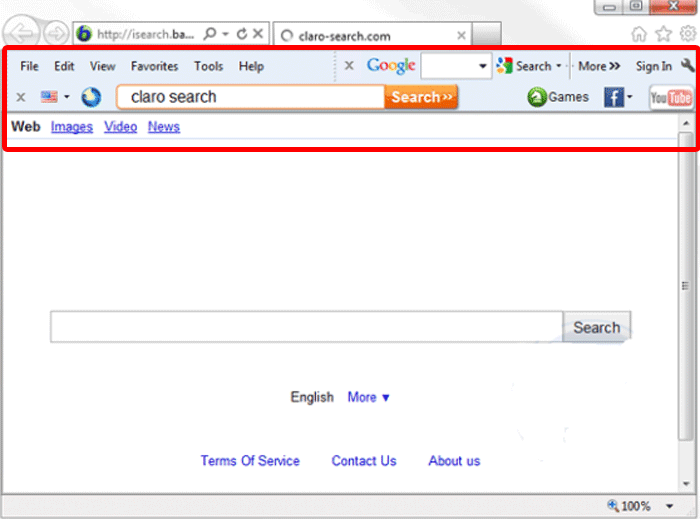 Claro LTD Toolbar (also known simply as the Claro Toolbar) is a PUP or adware add-on for your browser that's often installed with unrelated applications. Although the Claro LTD Toolbar may offer web accessibility and social networking features that are positive, its resistance to normal uninstall methods, casual changes to your browser settings and habitual attachment to popular sites like Facebook and Youtube may also make Claro LTD Toolbar a nuisance worth removing with a trustworthy anti-malware scanner. SpywareRemove.com malware experts only rate Claro LTD Toolbar as a low-level threat, although Claro LTD Toolbar, like many Potentially Unwanted Programs, may update itself to include other features of greater priority sometime in the future.
Why What's in a Name Isn't All About Claro LTD Toolbar That's in Your Browser
The Claro LTD Toolbar claims to be a beneficial assistant for online social networking and web-searching activities, although, in practice, Claro LTD Toolbar's real features amount to nothing more than unnecessary adware and browser hijacker-based attacks. Malware experts also deem it worth mentioning that the Claro LTD Toolbar is unaffiliated with the United Kingdom-based engineering company of the same name, although Claro LTD Toolbar may use the Claro brand name as part of its strategy for promoting itself as reputable software. The Claro LTD Toolbar has been known to come bundled with add-on Font packages and Clipart packs offered on various sites.
Claro LTD Toolbar infections are likely to be involved in the following attacks, all of which are typical for PUP-based PC threats:
- Adding toolbars to your web browsers that resist being disabled or uninstalled.
- Changing your default search engine to one that's more profitable for the Claro 'company' such as Isearch.claro-search.com.
- Changing your default home page or new tab page.
- Inserting additional content into the web pages of popular social networking websites. This content can include advertisements, keyword-based hyperlinks, or even changes that reorganize your search results.
Getting Your Browser Back to a Claro-Free State
Any attempt to revert your browser settings and other unwanted changes without removing the Claro LTD Toolbar, itself, is unlikely to succeed. Likewise, the Claro LTD Toolbar has a high chance of resisting Control Panel-based removal and other means of deleting applications by normal methods. Hence, SpywareRemove.com malware experts recommend that if you want to delete Claro LTD Toolbar you can choose to use a dependable anti-malware product.
Claro LTD Toolbar hasn't been found to cause other forms of damage to your computer, although side effects of a Claro LTD Toolbar infection can include exposure to potentially harmful web content that may result in other attacks. Prevention of a Claro LTD Toolbar infection in the first place should be primarily considered a matter of watching the software that you install – given that PUPs and adware like Claro LTD Toolbar are often included as optional add-ons with unrelated media programs.
Technical Details
File System Modifications
Tutorials: If you wish to learn how to remove malware components manually, you can read the tutorials on how to find malware, kill unwanted processes, remove malicious DLLs and delete other harmful files. Always be sure to back up your PC before making any changes.
The following files were created in the system:%PROGRAMFILES%\Claro LTD\claro\ClaroTB.xpi
File name: %PROGRAMFILES%\Claro LTD\claro\ClaroTB.xpiMime Type: unknown/xpi
Group: Malware file
%PROGRAMFILES%\Claro LTD\claro\1.6.4.1\escortShld.dll
File name: %PROGRAMFILES%\Claro LTD\claro\1.6.4.1\escortShld.dllFile type: Dynamic link library
Mime Type: unknown/dll
Group: Malware file
%PROGRAMFILES%\Claro LTD\claro\1.6.4.1\claroTlbr.dll
File name: %PROGRAMFILES%\Claro LTD\claro\1.6.4.1\claroTlbr.dllFile type: Dynamic link library
Mime Type: unknown/dll
Group: Malware file
%PROGRAMFILES%\Claro LTD\claro\1.6.4.1\clarosrv.exe
File name: %PROGRAMFILES%\Claro LTD\claro\1.6.4.1\clarosrv.exeFile type: Executable File
Mime Type: unknown/exe
Group: Malware file
%PROGRAMFILES%\Claro LTD\claro\1.6.4.1\claroEng.dll
File name: %PROGRAMFILES%\Claro LTD\claro\1.6.4.1\claroEng.dllFile type: Dynamic link library
Mime Type: unknown/dll
Group: Malware file
%PROGRAMFILES%\Claro LTD\claro\1.6.4.1\claroApp.dll
File name: %PROGRAMFILES%\Claro LTD\claro\1.6.4.1\claroApp.dllFile type: Dynamic link library
Mime Type: unknown/dll
Group: Malware file
%PROGRAMFILES%\Claro LTD\claro\1.6.4.1\bh\claro.dll
File name: %PROGRAMFILES%\Claro LTD\claro\1.6.4.1\bh\claro.dllFile type: Dynamic link library
Mime Type: unknown/dll
Group: Malware file
you re a pain
i never wanted it
never wanted
Don't want it. Go away.
i don't like it
i didn't ask for this
Don't want it don't trust it go away!
I never ask for it!!!!!!
never wanted
How do I get rid of this? I can't seem to disable it. Please get off my computer.
never wanted it
OMG this is the stupidest thing ever! I've download it just for itunes lyric importer and neither of them work >:c... FUCK u Claro! UGH now I can't remove this stupid app. Thanks a lot claro u made my life harder.
did not order
never wanted it......
This is stupid i never asked for it and never clicked download claro it just appeared one day
Never asked for it..Pain in the ass..!!
i never wanted anyway.
i do not want it
did not want it to start with
GET OFF MY COMPUTER !!! I AM GOING TO REPORT YOU !!! YOU ARE MUCH WORST THAN ANY VIRUS . tHERE HAS TO BE A LAW AGAINST THIS ????
I DONT LIKE IT
please cancel
GET OFF MY COMPUTER !!! I AM GOING TO REPORT YOU !!! YOU ARE MUCH WORST THAN ANY VIRUS . tHERE HAS TO BE A LAW AGAINST THIS
Never asked for it ! where did it come from that pest ???
how do people get rid of your tool bar. I removed it from my programs but it still comes up on fox fire. This is not good.
Get OFF my computer!
did not want it
how to remove tool bar
This is not what I put on my computer TAKE IT OFF I WILL REPORT YOU IF YOU DON"T
Did not order this app.
Please delete this tool bar, I did not ask for it!!
I've seen this 'install claro toolbar' (with all the blurb about the advantage of having it etc...) as an optional addon to software found on cover-disks from computer magazines. Its been around for a while now, I'm assuming that this happens for funding of publishing/producing media reasons. More often now, Google seems to be appearing -its even been aggressively installed by Avast AV (which is just as annoying if, like me, you dont want your browser changed from how you like it). I mainly saw Claro almost always as as add-on when installing Extra Font and Clipart packs.