File Restore
Posted: October 16, 2012
Threat Metric
The following fields listed on the Threat Meter containing a specific value, are explained in detail below:
Threat Level: The threat level scale goes from 1 to 10 where 10 is the highest level of severity and 1 is the lowest level of severity. Each specific level is relative to the threat's consistent assessed behaviors collected from SpyHunter's risk assessment model.
Detection Count: The collective number of confirmed and suspected cases of a particular malware threat. The detection count is calculated from infected PCs retrieved from diagnostic and scan log reports generated by SpyHunter.
Volume Count: Similar to the detection count, the Volume Count is specifically based on the number of confirmed and suspected threats infecting systems on a daily basis. High volume counts usually represent a popular threat but may or may not have infected a large number of systems. High detection count threats could lay dormant and have a low volume count. Criteria for Volume Count is relative to a daily detection count.
Trend Path: The Trend Path, utilizing an up arrow, down arrow or equal symbol, represents the level of recent movement of a particular threat. Up arrows represent an increase, down arrows represent a decline and the equal symbol represent no change to a threat's recent movement.
% Impact (Last 7 Days): This demonstrates a 7-day period change in the frequency of a malware threat infecting PCs. The percentage impact correlates directly to the current Trend Path to determine a rise or decline in the percentage.
| Ranking: | 14,501 |
|---|---|
| Threat Level: | 10/10 |
| Infected PCs: | 2,780 |
| First Seen: | October 16, 2012 |
|---|---|
| Last Seen: | March 1, 2025 |
| OS(es) Affected: | Windows |
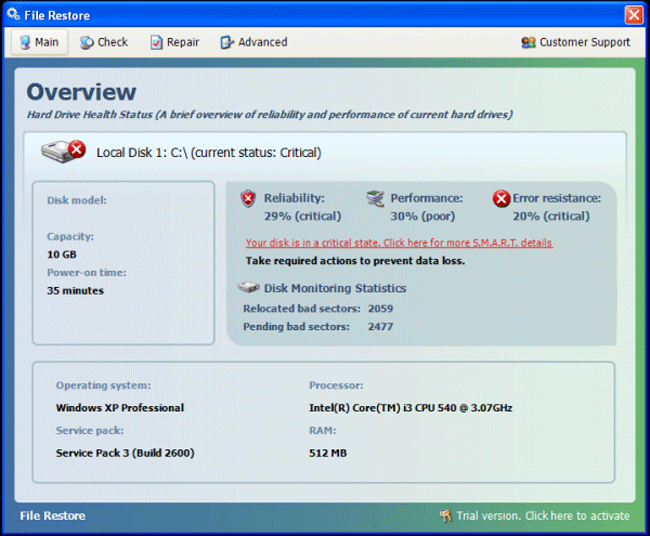 File Restore is one of many members of Fakesysdef (also known as FakeHDD), a category of similar PC threats that pretend to be file repairers, defragmenters and/or system cleaners. Far from being able to restore your files from any sort of damage, File Restore harms your PC by disabling necessary security features, blocking programs and displaying alerts about fake system damage issues. File Restore can be recognized visually as a clone of other members of FakeSysdef and should be removed with anti-malware software if File Restore is found on any computer. While File Restore recommends spending money on its software to 'fix' your PC, SpywareRemove.com malware experts have confirmed that File Restore doesn't have any features that you'd want to purchase.
File Restore and the Security Software Hoax (as Expressed Through Alarmist Pop-Ups)
File Restore and related Fakesysdef scamware programs may superficially look like defragmenters or other system tools, but their defragging scans and other features are nonfunctional except in the ability to deliver fake system information. Members of File Restore's family, including File Rescue, File Recovery, Hdd Fix, HDD Tools, SMART Repair, PC Repair and others are known for displaying frequent pop-up warnings that describe nonexistent system damage. These 'problems' that File Restore detects can range from simple HD formatting errors to severe temperature malfunctions with your hardware.
Between its fake scans and its fake pop-ups, File Restore would like you to spend money on File Restore's registration just to get your PC functional again – even though none of the problems that File Restore detects are real. SpywareRemove.com malware experts have also defined some other attacks File Restore may use in the course of misrepresenting your computer's health:
- File Restore may change your desktop to a fake warning message and lock it to that image.
- File Restore may use code injection tactics to conceal some of its files in normal system processes.
- Your browser settings may be attacked in ways that make it vulnerable to malicious content or attempts to steal information.
- Many other programs can be blocked or disabled by File Restore, including Task Manager and other Windows tools.
Restoring Your PC from an Unasked for File Restore Downgrade
Because purchasing File Restore should be considered a plainly self-destructive waste of money, you should disregard any alerts or prompts from File Restore, which SpywareRemove.com malware analysts have verified never to include accurate system information. Anti-malware programs can be used to remove File Restore's components and any PC threats (such as the ever-prolific Trojan downloaders) that often are complicit in scamware infections. Safe Mode or other safe system boot methods may be used for a safe scanning environment.
However, avoiding File Restore infections in the first place is preferable to knowing how to remove them. Infection vectors like fake updates for media software, hostile sites that use drive-by-download a la Blacole and spammed website links are all potential paths to a File Restore attack. Active anti-malware products should be able to detect such attacks before File Restore can infect your computer.
Technical Details
File System Modifications
Tutorials: If you wish to learn how to remove malware components manually, you can read the tutorials on how to find malware, kill unwanted processes, remove malicious DLLs and delete other harmful files. Always be sure to back up your PC before making any changes.
The following files were created in the system:C:\Documents and Settings\<username>\Documenti\Download\***s Rogue Pack\***'s Rogue Pack\DUMP_04E70000-04F69000.exe
File name: DUMP_04E70000-04F69000.exeSize: 1.01 MB (1019904 bytes)
MD5: dae81e01d143caaa70b126dc75971e58
Detection count: 30
File type: Executable File
Mime Type: unknown/exe
Path: C:\Documents and Settings\<username>\Documenti\Download\***s Rogue Pack\***'s Rogue Pack\DUMP_04E70000-04F69000.exe
Group: Malware file
Last Updated: April 6, 2024
%Desktopdir%\File_Restore.lnk
File name: %Desktopdir%\File_Restore.lnkFile type: Shortcut
Mime Type: unknown/lnk
Group: Malware file
%AppData%\Microsoft\Internet Explorer\Quick Launch\File_Restore.lnk
File name: %AppData%\Microsoft\Internet Explorer\Quick Launch\File_Restore.lnkFile type: Shortcut
Mime Type: unknown/lnk
Group: Malware file
%Programs%\File Restore\File Restore.lnk
File name: %Programs%\File Restore\File Restore.lnkFile type: Shortcut
Mime Type: unknown/lnk
Group: Malware file
%Programs%\File Restore\Uninstall File Restore.lnk
File name: %Programs%\File Restore\Uninstall File Restore.lnkFile type: Shortcut
Mime Type: unknown/lnk
Group: Malware file
%CommonAppData%\[RANDOM CHARACTERS_1]
File name: %CommonAppData%\[RANDOM CHARACTERS_1]Group: Malware file
%CommonAppiData%\[RANDOM CHARACTERS_1].exe
File name: %CommonAppiData%\[RANDOM CHARACTERS_1].exeFile type: Executable File
Mime Type: unknown/exe
Group: Malware file
%CommonAppData%\[RANDOM CHARACTERS_0].exe
File name: %CommonAppData%\[RANDOM CHARACTERS_0].exeFile type: Executable File
Mime Type: unknown/exe
Group: Malware file
Registry Modifications
File name without pathFile_Restore.lnkHKEY..\..\{Value}HKEY_LOCAL_MACHINE\SOFTWARE\Microsoft\Windows\CurrentVersion\Policies\System "DisableTaskMgr" = "0"HKEY_LOCAL_MACHINE\SOFTWARE\Microsoft\..{RunKeys}HKEY_LOCAL_MACHINE\SOFTWARE\Microsoft\Windows\CurrentVersion\Run "[RANDOM_0].exe" = "%CommonAppData%\[RANDOM CHARACTERS_0].exe"
Additional Information
| # | Message |
|---|---|
| 1 | Critical Error. Hard drive conroller failure |
| 2 | Critical error. Drive sector not found error |
| 3 | Data error reading drive C:\ |
| 4 | Device initialization failed |
| 5 | Error 0 – DATA_BUS_ERROR |
| 6 | Error 0×00000050 – PAGE_FAULT_IN_NONPAGED_AREA |
| 7 | Error 0×00000078 – INACCESSIBLE_BOOT_DEVICE |
| 8 | Error while relocating TARE sectors |
| 9 | Hard drive boot sector reading error |
| 10 | SMART state is "Out of order" before the disk scan |
| 11 | Seek error. Sector not found |
| 12 | System Error. Hard disk failure detected It’s highly recommended to run complete HDD scan to prevent loss of personal files. Scan and repair, Cancel and restart |
| 13 | System blocks were not found |
| 14 | System message – Write Fault Error A write command during the test has failed to complete. This may be due to a media or read/write error. The system generates an exception error when using a reference to an invalid system memory address. |
| 15 | The self-test procedure of the storage device has detected an irreparable errors. |
| 16 | The storage device has failed a self-test |
| 17 | This device cannot find enough free resources that it can use |
Leave a Reply
Please note that we are not able to assist with billing and support issues regarding SpyHunter or other products. If you're having issues with SpyHunter, please get in touch with SpyHunter customer support through your SpyHunter . If you have SpyHunter billing questions, we recommend you check the Billing FAQ. For general suggestions or feedback, contact us.