PC Repair
Posted: August 27, 2011
Threat Metric
The following fields listed on the Threat Meter containing a specific value, are explained in detail below:
Threat Level: The threat level scale goes from 1 to 10 where 10 is the highest level of severity and 1 is the lowest level of severity. Each specific level is relative to the threat's consistent assessed behaviors collected from SpyHunter's risk assessment model.
Detection Count: The collective number of confirmed and suspected cases of a particular malware threat. The detection count is calculated from infected PCs retrieved from diagnostic and scan log reports generated by SpyHunter.
Volume Count: Similar to the detection count, the Volume Count is specifically based on the number of confirmed and suspected threats infecting systems on a daily basis. High volume counts usually represent a popular threat but may or may not have infected a large number of systems. High detection count threats could lay dormant and have a low volume count. Criteria for Volume Count is relative to a daily detection count.
Trend Path: The Trend Path, utilizing an up arrow, down arrow or equal symbol, represents the level of recent movement of a particular threat. Up arrows represent an increase, down arrows represent a decline and the equal symbol represent no change to a threat's recent movement.
% Impact (Last 7 Days): This demonstrates a 7-day period change in the frequency of a malware threat infecting PCs. The percentage impact correlates directly to the current Trend Path to determine a rise or decline in the percentage.
| Ranking: | 19,149 |
|---|---|
| Threat Level: | 10/10 |
| Infected PCs: | 300 |
| First Seen: | August 27, 2011 |
|---|---|
| Last Seen: | February 22, 2025 |
| OS(es) Affected: | Windows |
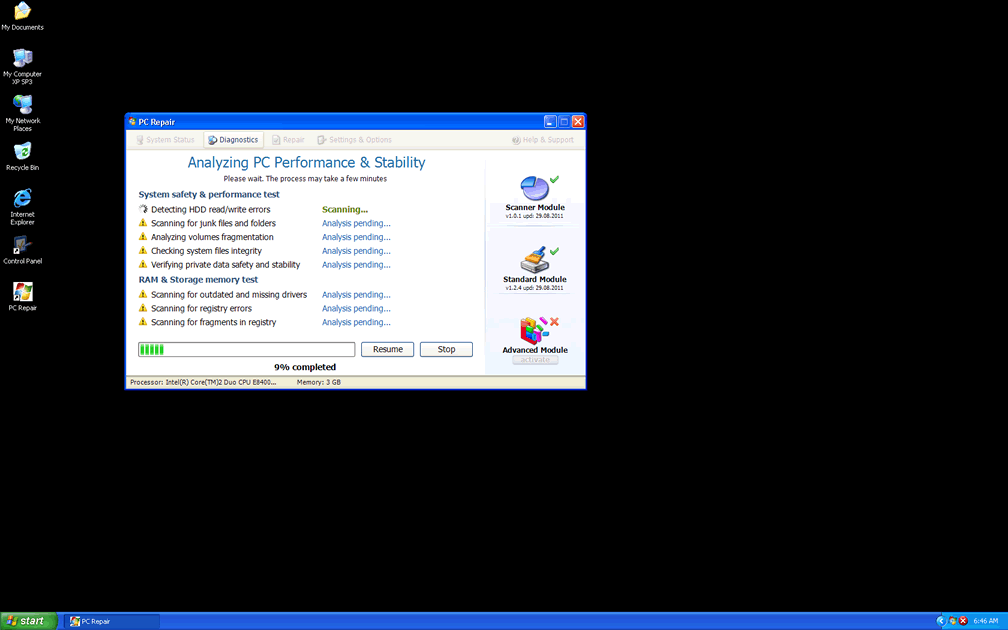
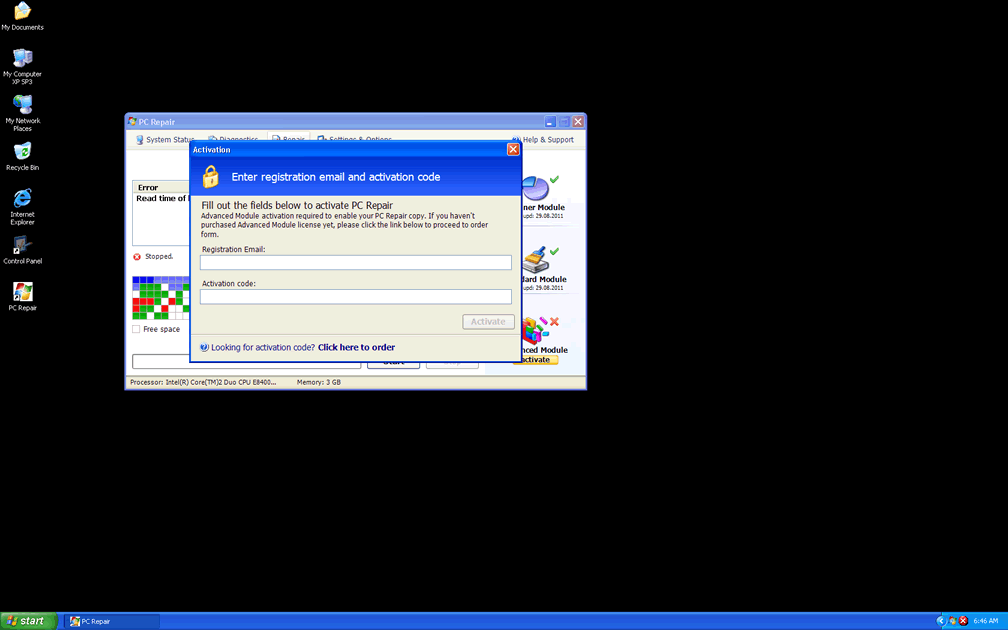
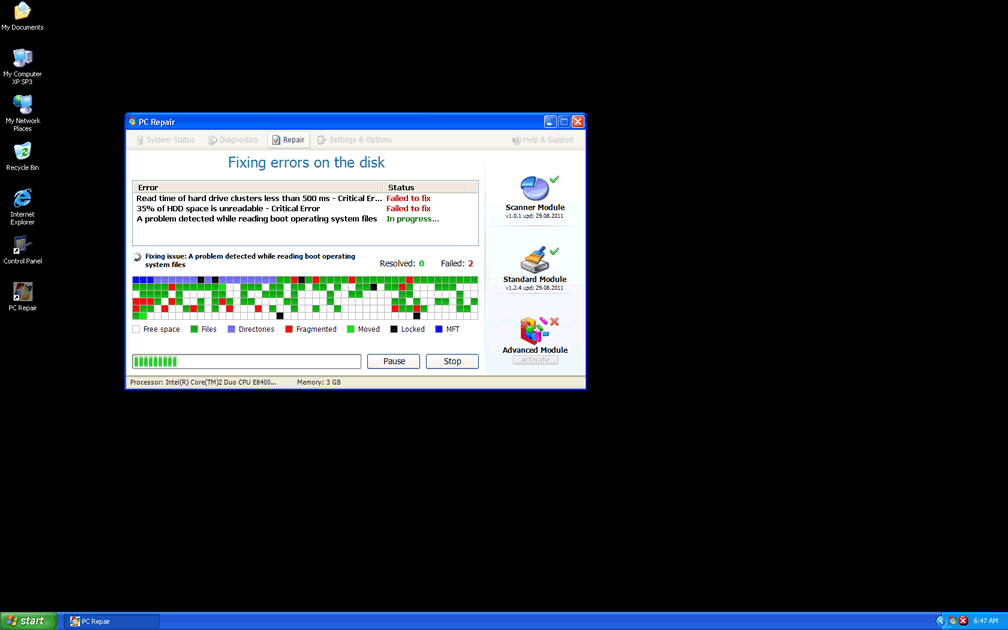
 PC Repair is a new version of a fake defragmenter from a long line of defraggers from the FakeSysDef family that reuse the majority of their code with a new name slapped on to avoid recognition. Although PC Repair claims to be able to repair your PC of fragmentation-related problems, installing PC Repair will cause serious harm to your PC, such as vanishing files, randomly-disabled applications, missing shortcuts and a small army of steadily-streaming error messages. Since SpywareRemove.com malware research team hasn't found any genuinely positive features in PC Repair, as well as noting significant risks with its presence, it's recommended that you remove PC Repair from your computer as quickly as possible. Because rootkits, browser hijackers and trojans are also associated with PC Repair infections, you should delete PC Repair with an anti-malware program that's also capable of detecting and removing such PC threats.
The Countless Fake Repair Features That PC Repair Shows Off
PC Repair is marketed in the form of a supposedly useful defragger program on its website, and trojans such as Vundo, Zlob and Fake Microsoft Security Essentials Alert have also been implicated as causes of PC Repair infections. In most cases, PC Repair will use a fake scanner or warning message to announce that your computer is infected prior to installation, although this isn't a hard rule.
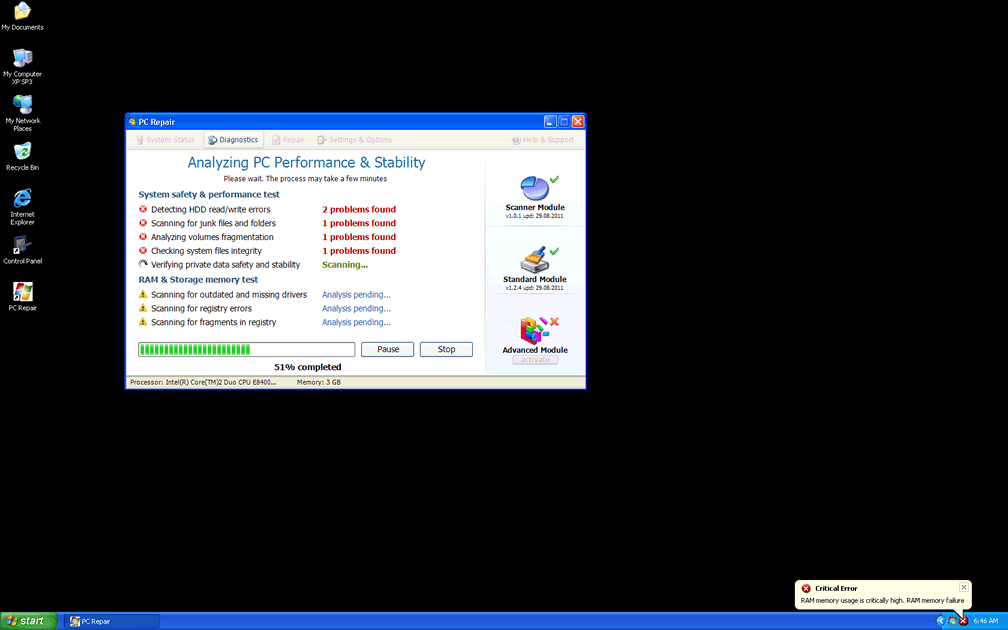
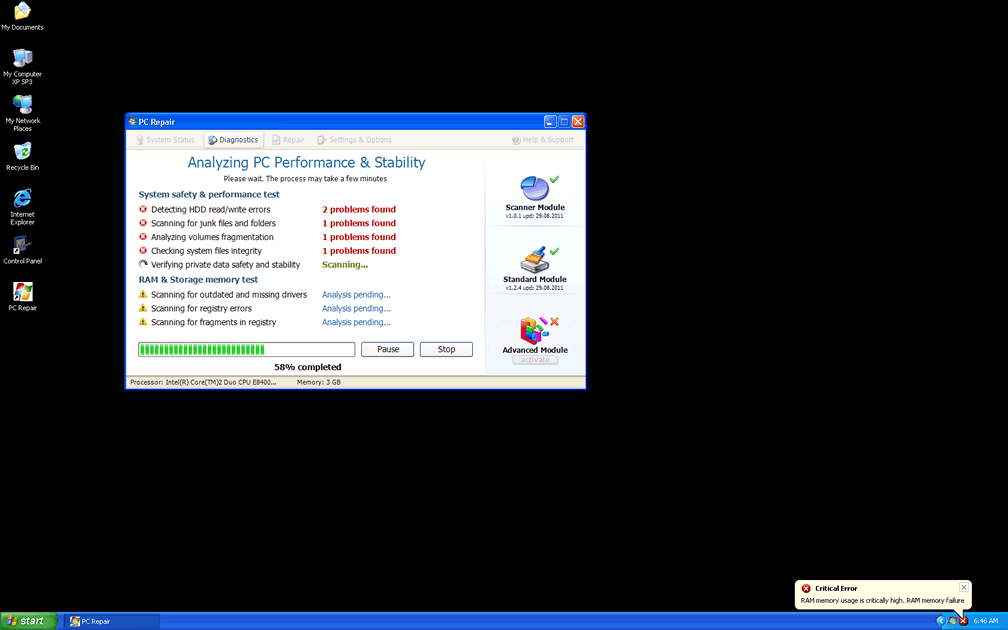
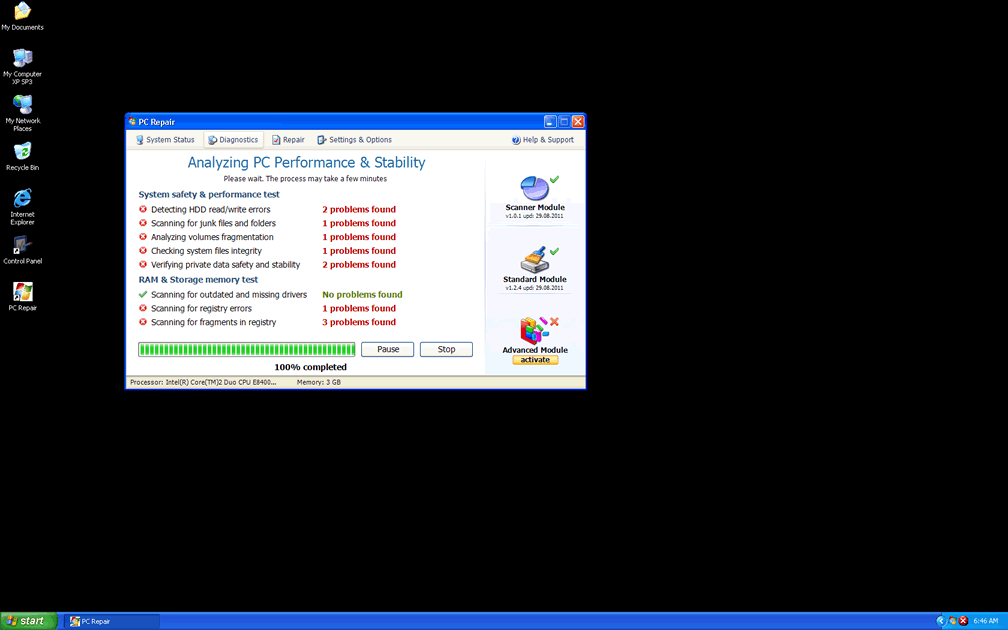
Once PC Repair has settled itself in, it will launch itself automatically and begin to pester you with fake alerts that are presented in a variety of ways, including through simulated system scans and Windows taskbar-based pop-ups.
You can safely ignore all of PC Repair's warnings, threats and pleadings for you to take action, since PC Repair isn't able to detect any of these errors on your computer, and, in fact, many of them are extremely unlikely to occur in the first place. The only purpose they have is to cause you to panic and force you to spend money on an activation key for PC Repair (you should consider using the free code '8475082234984902023718742058948' instead before you remove PC Repair).
Close relatives of PC Repair include System Defragmenter, Ultra Defragger, HDD Control, Win HDD, Win Defrag, Disk Doctor, Hard Drive Diagnostic, HDD Diagnostic, HDD Plus, HDD Repair, HDD Rescue, Smart HDD, Defragmenter, HDD Tools, Disk Repair, Windows Optimization Center, Scanner, HDD Low, Hdd Fix and Win Defragmenter. You should consider these rogue defragmenters to be just as fraudulent as PC Repair itself.
Doing the Repair Job That Will Put PC Repair Out of Work
Although the foremost concern with any PC Repair is the danger of spending money on it, SpywareRemove.com malware research team has also uncovered a range of other attacks that are coupled with PC Repair infections:
- PC Repair may try to hide the contents of folders. Although this is a Windows Explorer-based attack that works via the Registry, it won't delete or otherwise alter the actual files. You can use alternative programs to view and access any files that PC Repair tries to conceal.
- PC Repair, like many other types of scamware, will also try to block your security programs so that you find it difficult to delete PC Repair. In many cases, renaming a program file to something generic, such as 'iexplore.exe,' will let you duck under PC Repair's blacklist and launch the relevant application.
- SpywareRemove.com malware researchers have also been unhappy to note that PC Repair has had a new feature added to it that differentiates it from other rogue defraggers in its family - the ability to hide program shortcuts in your Temp folder. Because of this, it's strongly encouraged that you avoid deleting any files in this folder or using any temporary file removal features until you've restored your shortcuts and deleted PC Repair.



Technical Details
File System Modifications
Tutorials: If you wish to learn how to remove malware components manually, you can read the tutorials on how to find malware, kill unwanted processes, remove malicious DLLs and delete other harmful files. Always be sure to back up your PC before making any changes.
The following files were created in the system:C:\Fakehdd list #1\dff7eac5c0c22591552da891c5364bfd
File name: dff7eac5c0c22591552da891c5364bfdSize: 457.21 KB (457216 bytes)
MD5: dff7eac5c0c22591552da891c5364bfd
Detection count: 12
Path: C:\Fakehdd list #1\dff7eac5c0c22591552da891c5364bfd
Group: Malware file
Last Updated: May 6, 2024
C:\Fakehdd list #1\6cb0128ef745a1472606f1d4c82e914e
File name: 6cb0128ef745a1472606f1d4c82e914eSize: 414.2 KB (414208 bytes)
MD5: 6cb0128ef745a1472606f1d4c82e914e
Detection count: 9
Path: C:\Fakehdd list #1\6cb0128ef745a1472606f1d4c82e914e
Group: Malware file
Last Updated: May 6, 2024
C:\Fakehdd list #1\7278fc37d52351374587e0e2f0d26aa2
File name: 7278fc37d52351374587e0e2f0d26aa2Size: 466.94 KB (466944 bytes)
MD5: 7278fc37d52351374587e0e2f0d26aa2
Detection count: 9
Path: C:\Fakehdd list #1\7278fc37d52351374587e0e2f0d26aa2
Group: Malware file
Last Updated: May 6, 2024
C:\Fakehdd list #1\cabf1f8a66e33b0dfd6a6c8fad28a1e1
File name: cabf1f8a66e33b0dfd6a6c8fad28a1e1Size: 462.84 KB (462848 bytes)
MD5: cabf1f8a66e33b0dfd6a6c8fad28a1e1
Detection count: 9
Path: C:\Fakehdd list #1\cabf1f8a66e33b0dfd6a6c8fad28a1e1
Group: Malware file
Last Updated: May 6, 2024
C:\Fakehdd list #1\01ef539c0d873d506f7c337b7cbbcfed
File name: 01ef539c0d873d506f7c337b7cbbcfedSize: 448.51 KB (448512 bytes)
MD5: 01ef539c0d873d506f7c337b7cbbcfed
Detection count: 9
Path: C:\Fakehdd list #1\01ef539c0d873d506f7c337b7cbbcfed
Group: Malware file
Last Updated: May 6, 2024
%LocalAppData%\[RANDOM CHARACTERS]
File name: %LocalAppData%\[RANDOM CHARACTERS]Group: Malware file
%LocalAppData%\[RANDOM CHARACTERS].exe
File name: %LocalAppData%\[RANDOM CHARACTERS].exeFile type: Executable File
Mime Type: unknown/exe
Group: Malware file
%LocalAppData%\~[RANDOM CHARACTERS]
File name: %LocalAppData%\~[RANDOM CHARACTERS]Group: Malware file
%StartMenu%\Programs\PC Repair\
File name: %StartMenu%\Programs\PC Repair\Group: Malware file
%StartMenu%\Programs\PC Repair\Uninstall PC Repair.lnk
File name: %StartMenu%\Programs\PC Repair\Uninstall PC Repair.lnkFile type: Shortcut
Mime Type: unknown/lnk
Group: Malware file
%StartMenu%\Programs\PC Repair\PC Repair.lnk
File name: %StartMenu%\Programs\PC Repair\PC Repair.lnkFile type: Shortcut
Mime Type: unknown/lnk
Group: Malware file
%UserProfile%\Desktop\PC Repair.lnk
File name: %UserProfile%\Desktop\PC Repair.lnkFile type: Shortcut
Mime Type: unknown/lnk
Group: Malware file
%Temp%\smtmp\
File name: %Temp%\smtmp\Group: Malware file
%Temp%\smtmp\1
File name: %Temp%\smtmp\1Group: Malware file
%Temp%\smtmp\2
File name: %Temp%\smtmp\2Group: Malware file
%Temp%\smtmp\3
File name: %Temp%\smtmp\3Group: Malware file
%Temp%\smtmp\4
File name: %Temp%\smtmp\4Group: Malware file
Registry Modifications
HKEY..\..\..\..{Subkeys}HKEY_CURRENT_USER\Software\Microsoft\Internet Explorer\Main "Use FormSuggest" = 'Yes'HKEY_CURRENT_USER\Software\Microsoft\Windows\CurrentVersion\Internet Settings "WarnonBadCertRecving" = '0'HKEY_CURRENT_USER\Software\Microsoft\Windows\CurrentVersion\Internet Settings "CertificateRevocation" = '0'HKEY_CURRENT_USER\Software\Microsoft\Windows\CurrentVersion\Policies\ActiveDesktop "NoChangingWallPaper" = '1'HKEY_CURRENT_USER\Software\Microsoft\Windows\CurrentVersion\Policies\Attachments "SaveZoneInformation" = '1'HKEY_CURRENT_USER\Software\Microsoft\Windows\CurrentVersion\Policies\System "DisableTaskMgr" = '1'HKEY_CURRENT_USER\Software\Microsoft\Windows\CurrentVersion\Policies\Explorer "NoDesktop" = '1'HKEY_CURRENT_USER\Software\Microsoft\Windows\CurrentVersion\Policies\Associations "LowRiskFileTypes" = '/{hq:/s's:/ogn:/uyu:/dyd:/c'u:/bnl:/ble:/sdf:/lrh:/iul:/iulm:/fhg:/clq:/kqf:/'wh:/lqf:/lqdf:/lnw:/lq2:/l2t:/v'w:/rbs:'HKEY_CURRENT_USER\Software\Microsoft\Windows\CurrentVersion\Explorer\Advanced "Hidden" = '0'HKEY_CURRENT_USER\Software\Microsoft\Windows\CurrentVersion\Explorer\Advanced "ShowSuperHidden" = '0'HKEY_CURRENT_USER\Software\Microsoft\Windows\CurrentVersion\Explorer\ComDlg32\LastVisitedMRU "MRUList"HKEY_LOCAL_MACHINE\SOFTWARE\Microsoft\Windows\CurrentVersion\policies\system "DisableTaskMgr" = '1'HKEY_CURRENT_USER\Software\Microsoft\Internet Explorer\Download "CheckExeSignatures" = 'no'HKEY_LOCAL_MACHINE\SOFTWARE\Microsoft\..{RunKeys}HKEY_CURRENT_USER\Software\Microsoft\Windows\CurrentVersion\Run "[RANDOM CHARACTERS].exe"HKEY_CURRENT_USER\Software\Microsoft\Windows\CurrentVersion\Run "[RANDOM CHARACTERS]"
Additional Information
| # | Message |
|---|---|
| 1 | Bad sectors on hard drive or damaged file allocation table |
| 2 | Critical Error A critical error has occurred while indexing data stored on hard drive. System restart required. |
| 3 | Critical Error Hard Drive not found. Missing hard drive. |
| 4 | Critical Error Hard drive critical error. Run a system diagnostic utility to check your hard disk drive for errors. Windows can't find hard disk space. Hard drive error. |
| 5 | Critical Error RAM memory usage is critically high. RAM memory failure. |
| 6 | Critical Error Windows can't find hard disk space. Hard drive error |
| 7 | Critical Error! Damaged hard drive clusters detected. Private data is at risk. |
| 8 | Critical Error! Windows was unable to save all the data for the file \System32\496A8300. The data has been lost. This error may be caused by a failure of your computer hardware. |
| 9 | GPU RAM temperature is critically high. Urgent RAM memory optimization is required to prevent system crash |
| 10 | Hard Drive Failure The system has detected a problem with one or more installed IDE / SATA hard disks. It is recommended that you restart the system. |
| 11 | Low Disk Space You are running very low disk space on Local Disk (C:). |
| 12 | PC Repair Diagnostics Windows detected a hard disk error. A problem with the hard drive sectors has been detected. It is recommended to download the following sertified [sic] software to fix the detected hard drive problems. Do you want to download recommended software? |
| 13 | Ram Temperature is 83 C. Optimization is required for normal operation. |
| 14 | Requested registry access is not allowed. Registry defragmentation required |
| 15 | System Error An error occurred while reading system files. Run a system diagnostic utility to check your hard disk drive for errors. |
| 16 | System Restore The system has been restored after a critical error. Data integrity and hard drive integrity verification required. |
PC Repair kept us from using IE and could not get access to find a solution to remove it. Thankfully for safe mode, we were able to view this removal guide and use your spyhunter to detect it. Worked like a charm and have not looked back. Such a beautiful thing to get honest help. thanks you spywareremove guys!
please delete me from Safe pc repair, thank you