IEAntiVirus
Posted: April 25, 2008
Threat Metric
The following fields listed on the Threat Meter containing a specific value, are explained in detail below:
Threat Level: The threat level scale goes from 1 to 10 where 10 is the highest level of severity and 1 is the lowest level of severity. Each specific level is relative to the threat's consistent assessed behaviors collected from SpyHunter's risk assessment model.
Detection Count: The collective number of confirmed and suspected cases of a particular malware threat. The detection count is calculated from infected PCs retrieved from diagnostic and scan log reports generated by SpyHunter.
Volume Count: Similar to the detection count, the Volume Count is specifically based on the number of confirmed and suspected threats infecting systems on a daily basis. High volume counts usually represent a popular threat but may or may not have infected a large number of systems. High detection count threats could lay dormant and have a low volume count. Criteria for Volume Count is relative to a daily detection count.
Trend Path: The Trend Path, utilizing an up arrow, down arrow or equal symbol, represents the level of recent movement of a particular threat. Up arrows represent an increase, down arrows represent a decline and the equal symbol represent no change to a threat's recent movement.
% Impact (Last 7 Days): This demonstrates a 7-day period change in the frequency of a malware threat infecting PCs. The percentage impact correlates directly to the current Trend Path to determine a rise or decline in the percentage.
| Threat Level: | 10/10 |
|---|---|
| Infected PCs: | 138 |
| First Seen: | July 24, 2009 |
|---|---|
| Last Seen: | January 23, 2022 |
| OS(es) Affected: | Windows |
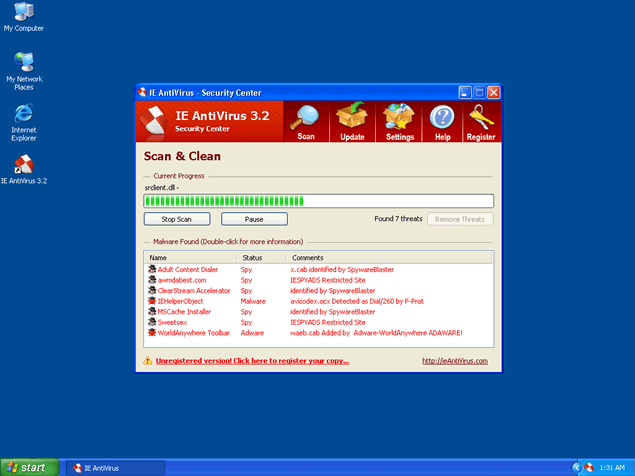
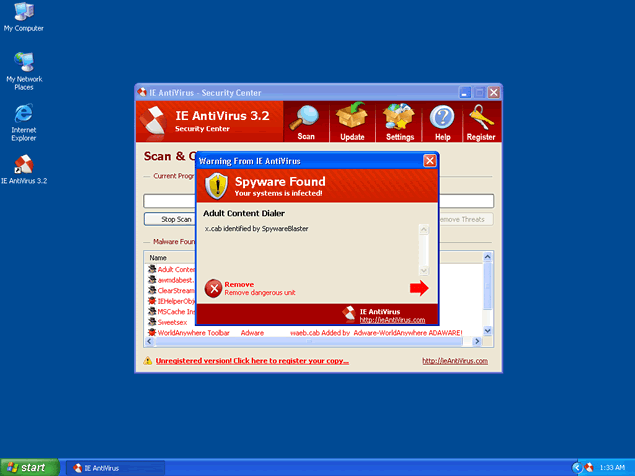 IEAntiVirus, or IE AntiVirus 3.2, is a rogue anti-spyware program due to its deceptive and aggressive advertising practices. IE AntiVirus and its marketing affiliates are distributing and installing IE AntiVirus's anti-spyware program through a download which is bundled with a trojan triggered by a browser helper object (BHO). Many of these trojan bundled downloads are located in sites which offer a "video codec" to be able to view free adult entertainment videos.
After your PC is infected with the trojan bundled download, it keeps showing up a popup stating "NOTICE: Your system is infected and your computer performance is not at the highest level. Full system optimization will greatly increase your computer's performance and prevent data loss". When you click on the popup, it will direct your IE to www.IEAntiVirus.com to download IE AntiVirus's anti-spyware program.
In addition, the trojan which came bundled from either IE AntiVirus and/or its affiliates hijacks your search engines, such as Google, Yahoo and MSN, and displays a fake error message within your search results claiming that your system is infected and offering to buy the IE AntiVirus program. Once you click on this fake error message you will be redirected to IE AntiVirus's home site where you will be tricked into buying IE AntiVirus's anti-spyware application.
Aliases
More aliases (408)
Technical Details
File System Modifications
Tutorials: If you wish to learn how to remove malware components manually, you can read the tutorials on how to find malware, kill unwanted processes, remove malicious DLLs and delete other harmful files. Always be sure to back up your PC before making any changes.
The following files were created in the system:fas64.dll
File name: fas64.dllSize: 215.55 KB (215552 bytes)
MD5: cba7a6b2b3f0f0005c3f0af84457099d
Detection count: 86
File type: Dynamic link library
Mime Type: unknown/dll
Group: Malware file
Last Updated: December 11, 2009
siebho.dll
File name: siebho.dllSize: 216.06 KB (216064 bytes)
MD5: e36a4be03a4786cee0df2de674939bec
Detection count: 85
File type: Dynamic link library
Mime Type: unknown/dll
Group: Malware file
Last Updated: December 11, 2009
ieav.exe
File name: ieav.exeSize: 1.52 MB (1529856 bytes)
MD5: 289c34ceceff2545ec771c3d999c6a04
Detection count: 85
File type: Executable File
Mime Type: unknown/exe
Group: Malware file
Last Updated: December 11, 2009
nsn14B.dll
File name: nsn14B.dllSize: 433.15 KB (433152 bytes)
MD5: d5caf214eb0323595a85577dcf560845
Detection count: 84
File type: Dynamic link library
Mime Type: unknown/dll
Group: Malware file
Last Updated: December 11, 2009
ieav.exe
File name: ieav.exeSize: 1.81 MB (1812480 bytes)
MD5: f91dc8dd0fd8de86f81268284abe469f
Detection count: 66
File type: Executable File
Mime Type: unknown/exe
Group: Malware file
Last Updated: December 11, 2009
vidas32.dll
File name: vidas32.dllSize: 211.96 KB (211968 bytes)
MD5: 349b62c73a9f956b9791130888e28604
Detection count: 64
File type: Dynamic link library
Mime Type: unknown/dll
Group: Malware file
Last Updated: December 11, 2009
nse23.dll
File name: nse23.dllSize: 80.89 KB (80896 bytes)
MD5: 1727958c8b8ce26c21da459fe766d228
Detection count: 56
File type: Dynamic link library
Mime Type: unknown/dll
Group: Malware file
Last Updated: December 11, 2009
bosdgo.dll
File name: bosdgo.dllSize: 13.31 KB (13312 bytes)
MD5: 8b23da8a1c0375b01fd98d7642f27e1c
Detection count: 44
File type: Dynamic link library
Mime Type: unknown/dll
Group: Malware file
Last Updated: December 11, 2009
kol.dll
File name: kol.dllSize: 218.11 KB (218112 bytes)
MD5: b253f96eb0df6120fd8fa6b3f407bdf3
Detection count: 44
File type: Dynamic link library
Mime Type: unknown/dll
Group: Malware file
Last Updated: December 11, 2009
ssvanasus.dll
File name: ssvanasus.dllSize: 217.6 KB (217600 bytes)
MD5: e5ac5b9d217a9ebe474f38e2680e3e54
Detection count: 36
File type: Dynamic link library
Mime Type: unknown/dll
Group: Malware file
Last Updated: December 11, 2009
tuvWqPiJ.dll
File name: tuvWqPiJ.dllSize: 281.6 KB (281600 bytes)
MD5: 9e7bb5dcb0b67b4d398fdc86c105a0ea
Detection count: 31
File type: Dynamic link library
Mime Type: unknown/dll
Group: Malware file
Last Updated: December 11, 2009
z_view.dll
File name: z_view.dllSize: 20.48 KB (20480 bytes)
MD5: 311548c9cd51ea0950c4223fef99ac6f
Detection count: 26
File type: Dynamic link library
Mime Type: unknown/dll
Group: Malware file
Last Updated: December 11, 2009
fop32.dll
File name: fop32.dllSize: 216.57 KB (216576 bytes)
MD5: feb062cd22eb714189aa7ce902bb78dd
Detection count: 25
File type: Dynamic link library
Mime Type: unknown/dll
Group: Malware file
Last Updated: December 11, 2009
ANTIVIRUS.exe
File name: ANTIVIRUS.exeSize: 1.96 MB (1965056 bytes)
MD5: fdab1e2cb3ebfc5de993183bff0cf786
Detection count: 24
File type: Executable File
Mime Type: unknown/exe
Group: Malware file
Last Updated: December 11, 2009
ieav.exe
File name: ieav.exeSize: 1.67 MB (1677312 bytes)
MD5: d147905dcb660587b4da7230d57404cd
Detection count: 21
File type: Executable File
Mime Type: unknown/exe
Group: Malware file
Last Updated: December 11, 2009
wsol.dll and_others
File name: wsol.dll and_othersSize: 225.79 KB (225792 bytes)
MD5: c0f08e4fcc7aad8e804ac6735cd31d14
Detection count: 15
Mime Type: unknown/dll and_others
Group: Malware file
Last Updated: December 11, 2009
unonasad.dll
File name: unonasad.dllSize: 220.16 KB (220160 bytes)
MD5: f1344781d598d66b2a259be756e46609
Detection count: 14
File type: Dynamic link library
Mime Type: unknown/dll
Group: Malware file
Last Updated: December 11, 2009
More files
Registry Modifications
CLSID{69F6C0AE-0C78-4999-B6D1-62932A265C5D}{F65E955E-26C0-42FF-8EE2-443A05EA286A}
wow...i actually fell for IEAntiVirus.....................
it couldn't remove this IE Antivirus on my client PC , pls help to advise..
what an excellent tutorial, first class, well done, many thanks!!!
This got onto my computer and completely crashed but ty for all this information.It has helped me get my puter running again.
My computer is not infected with ieantivirus but it regularly prompts to download this antivirus.I havent installed yet.How can i remove this prompt.