Smart Anti-Malware Protection
Posted: February 2, 2012
Threat Metric
The following fields listed on the Threat Meter containing a specific value, are explained in detail below:
Threat Level: The threat level scale goes from 1 to 10 where 10 is the highest level of severity and 1 is the lowest level of severity. Each specific level is relative to the threat's consistent assessed behaviors collected from SpyHunter's risk assessment model.
Detection Count: The collective number of confirmed and suspected cases of a particular malware threat. The detection count is calculated from infected PCs retrieved from diagnostic and scan log reports generated by SpyHunter.
Volume Count: Similar to the detection count, the Volume Count is specifically based on the number of confirmed and suspected threats infecting systems on a daily basis. High volume counts usually represent a popular threat but may or may not have infected a large number of systems. High detection count threats could lay dormant and have a low volume count. Criteria for Volume Count is relative to a daily detection count.
Trend Path: The Trend Path, utilizing an up arrow, down arrow or equal symbol, represents the level of recent movement of a particular threat. Up arrows represent an increase, down arrows represent a decline and the equal symbol represent no change to a threat's recent movement.
% Impact (Last 7 Days): This demonstrates a 7-day period change in the frequency of a malware threat infecting PCs. The percentage impact correlates directly to the current Trend Path to determine a rise or decline in the percentage.
| Threat Level: | 10/10 |
|---|---|
| Infected PCs: | 871 |
| First Seen: | February 2, 2012 |
|---|---|
| Last Seen: | June 19, 2023 |
| OS(es) Affected: | Windows |
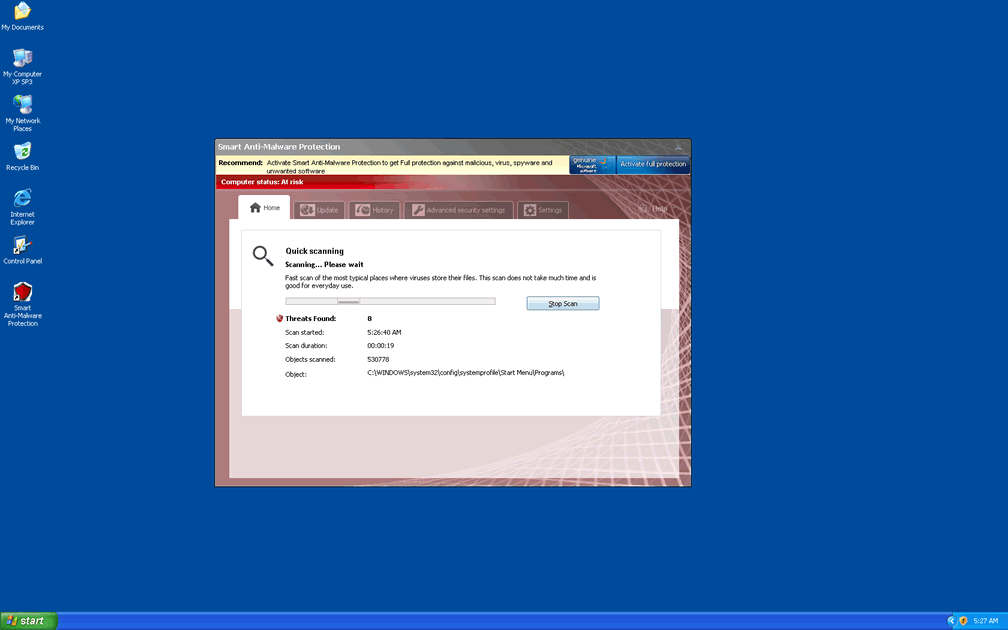
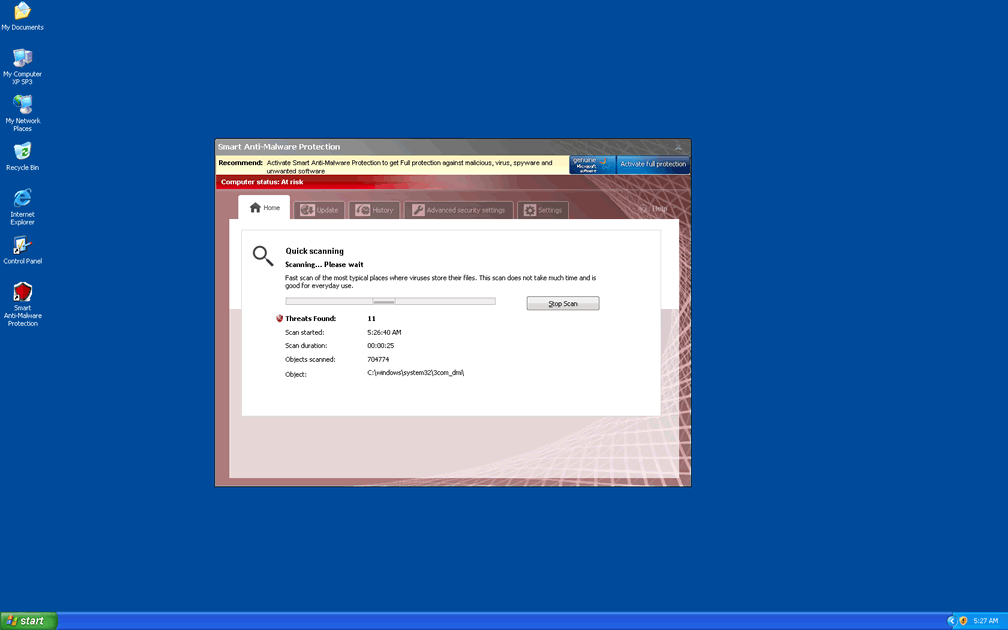
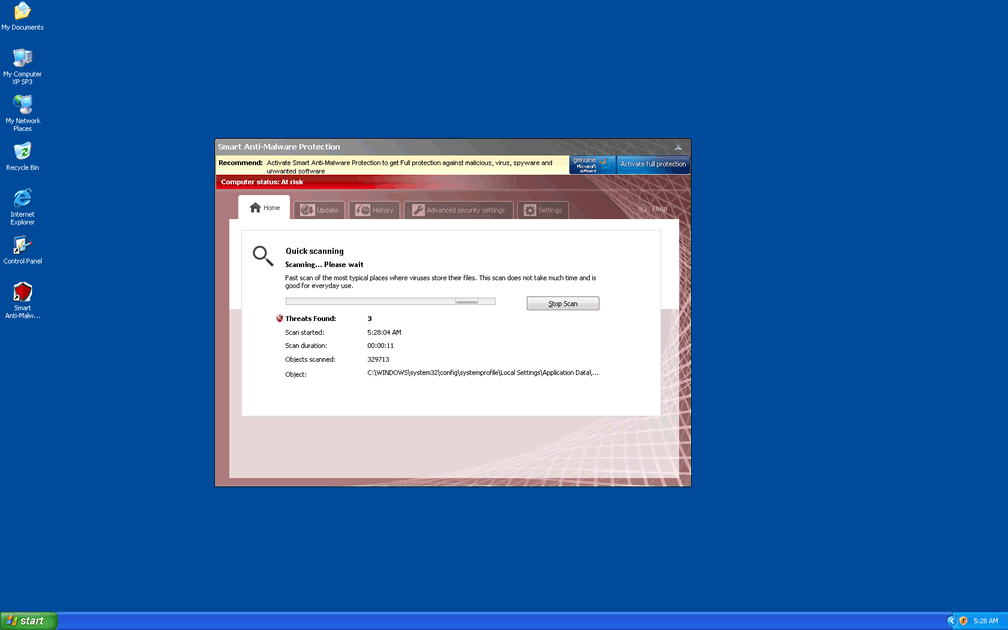
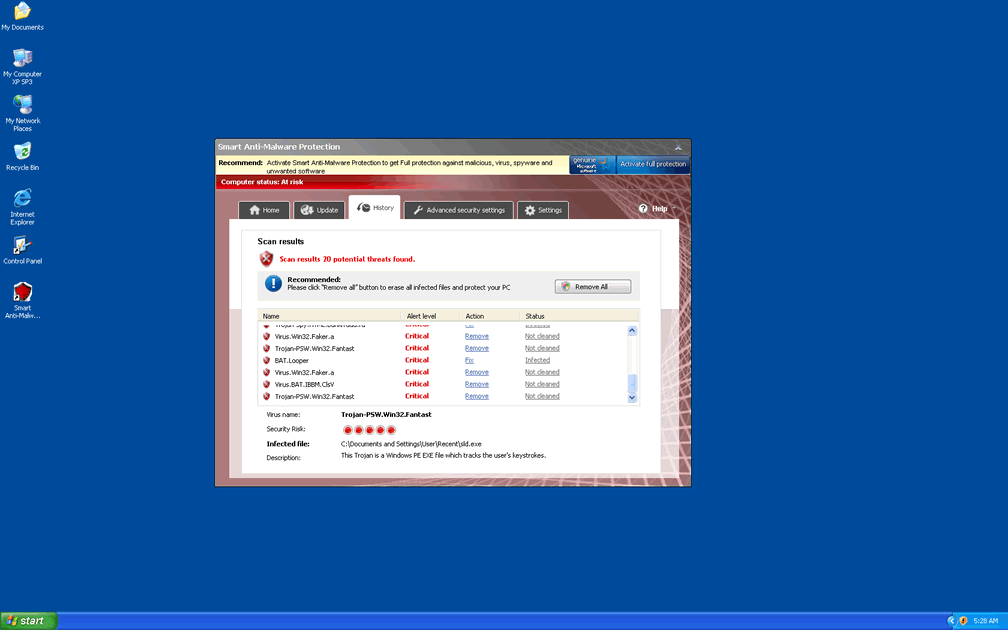
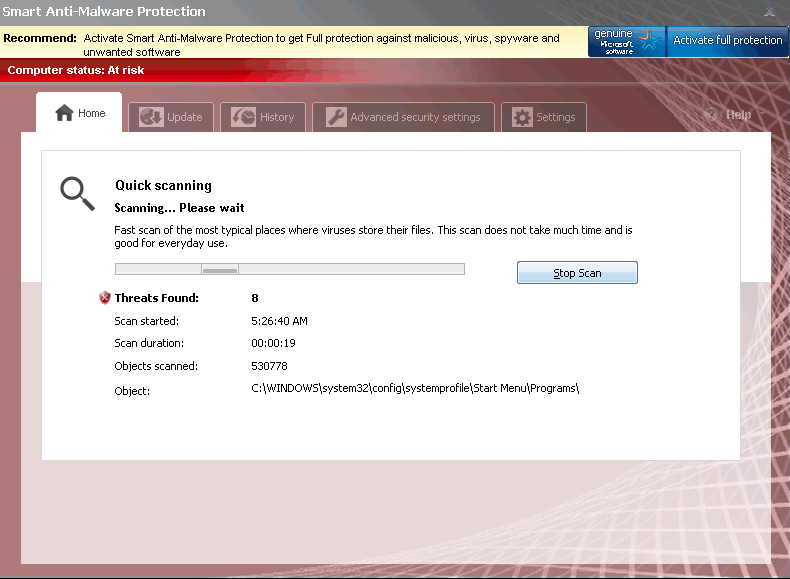 Smart Anti-Malware Protection may look and act like an anti-malware scanner, but scans and alerts from Smart Anti-Malware Protection can all be safely disregarded as inaccurate or, at the bare minimum, misleading. As a copy of other rogue anti-malware applications from its family, Smart Anti-Malware Protection doesn't have anything new to offer your PC except for a new name with which Smart Anti-Malware Protection tries to steal your money. Because Smart Anti-Malware Protection may also block your legitimate security programs, create junk files that Smart Anti-Malware Protection falsely-labels as PC threats or even hijack your web browser, SpywareRemove.com malware researchers consider removing Smart Anti-Malware Protection ASAP and with good anti-malware software to be the truly 'smart' thing to do.
Why Letting Smart Anti-Malware Protection 'Help' Your PC Isn't a Bright Move
Smart Anti-Malware Protection, although it has the external looks of a real anti-malware scanner, lacks all of the real features that a legitimate anti-malware program could offer your PC. Other than its name change, Smart Anti-Malware Protection can be considered identical to other types of rogue anti-malware scanners from its subgroup, and contact with any of Smart Anti-Malware Protection's clones or associated websites should be considered just as harmful to your PC as contact with Smart Anti-Malware Protection itself would be. Other members of the FakeVimes family include Privacy Guard Pro, Extra Antivirus, Fast Antivirus 2009, Presto TuneUp, Windows Security Suite, Smart Virus Eliminator, Packed.Generic.245, Volcano Security Suite, Windows Enterprise Suite, Enterprise Suite, Additional Guard, Live PC Care, PC Live Guard, Live Enterprise Suite, Security Antivirus, My Security Wall, CleanUp Antivirus, Smart Security and PrivacyGuard Pro 2.0.
SpywareRemove.com malware experts recommend that computer users do their best to ignore any alerts, system scans or other forms of information that Smart Anti-Malware Protection may offer until you can delete Smart Anti-Malware Protection with a real anti-malware program, since Smart Anti-Malware Protection has no ability to detect PC threats and all of its warnings are just roundabout methods of trying to force you to spend money on its fake software. Some of Smart Anti-Malware Protection's warning messages include but aren't limited to the samples noted here:
Security Center Alert
To help protect your computer, Security Center has blocked some features of this program.
Name: Win64.BIT.Looker.exe
Risk: High
ERROR MESSAGE:
Warning
Warning! Virus detected
Threat Detected: Trojan-Spy.HTML.Sunfraud.a
Security Center
Unauthorized remote connection!
Your system is making an unauthorized personal data transfer to a remote computer!
Warning! Unauthorized personal data transfer is detected! It may be your personal credit card details, logins and passwords, browsing habits or information about files you have downloaded.
To protect your private data, please click "Prevent Connection" button below.
System warning
No real-time malware, spyware and virus protection was found. Click here to activate.
WARNING! 371 threats detected
Detected malicious programs can damage your computer and compromise your privacy. It’s strongly recommended to remove them immediately [sic]!
Potential risks: Infecting other computers on your network
Continue unprotected Remove all threats now
Warning! Identity theft attempt detected
Hidden connection IP: 128.154.26.11
Target: Microsoft Corporation keys
Insecurity Internet activity. Threat of virus attack
Due to insecure Internet browsing your PC can easily get infected with viruses, worms and Trojans without knowledge, and that can lead to system slowdown, freezes and crashes. Also insecure Internet activity can result in revealing your personal information. To get full advanced real-time protection for PC and Internet activity, register your antivirus software.
Protecting Your Computer from a Smart Anti-Malware Protection Invasion
Until Smart Anti-Malware Protection is removed via suitable anti-malware software, you may also be forced to deal with additional attacks by Smart Anti-Malware Protection that are used to deceive your perception of your computer's integrity. Some dangers that have also been coupled with Smart Anti-Malware Protection and other scamware programs from its family include:
- The creation of fake .dll and .sys 'virus' files in your operating system's folder.
- Browser redirect attacks that cause Smart Anti-Malware Protection's website to load or block PC security domains from being loaded.
- Blocked anti-malware applications – this may include fake warning messages about these programs being damaged or infected.
In spite of all of these security-reducing functions, SpywareRemove.com malware researchers pleasantly noted that Smart Anti-Malware Protection can still be removed by competent anti-malware programs, as long as appropriate steps are taken to disable Smart Anti-Malware Protection from launching beforehand; popular solutions for accomplishing this include booting into Safe Mode, booting from a removable hard drive or booting into a secondary OS. Like many other types of PC threats, Smart Anti-Malware Protection has, so far, been noted for its inability to attack operating systems other than Windows.
Aliases
More aliases (367)
Technical Details
File System Modifications
Tutorials: If you wish to learn how to remove malware components manually, you can read the tutorials on how to find malware, kill unwanted processes, remove malicious DLLs and delete other harmful files. Always be sure to back up your PC before making any changes.
The following files were created in the system:%APPDATA%\Microsoft\Windows\AdvService.exe
File name: AdvService.exeSize: 421.88 KB (421888 bytes)
MD5: b8aa527c20fd1a6a40fb43d02ef66ab7
Detection count: 190
File type: Executable File
Mime Type: unknown/exe
Path: %APPDATA%\Microsoft\Windows
Group: Malware file
Last Updated: December 17, 2012
%TEMP%\mama.exe
File name: mama.exeSize: 491.52 KB (491520 bytes)
MD5: 07a8a3dfe4e53f65dab43c5077028598
Detection count: 129
File type: Executable File
Mime Type: unknown/exe
Path: %TEMP%
Group: Malware file
Last Updated: December 11, 2012
C:\Users\<username>\AppData\Roaming\Microsoft\Windows\Start Menu\Programs\Startup\us.exe
File name: us.exeSize: 137.21 KB (137216 bytes)
MD5: 76315677eb12c5d30ffb51b2d9fc8fd4
Detection count: 70
File type: Executable File
Mime Type: unknown/exe
Path: C:\Users\<username>\AppData\Roaming\Microsoft\Windows\Start Menu\Programs\Startup\us.exe
Group: Malware file
Last Updated: February 20, 2022
C:\MrtTool\MrtService.EXE
File name: MrtService.EXESize: 116.73 KB (116736 bytes)
MD5: 2d1d52bb1f634e62d9c5940c94a10530
Detection count: 47
File type: Executable File
Mime Type: unknown/EXE
Path: C:\MrtTool
Group: Malware file
Last Updated: December 17, 2012
%LOCALAPPDATA%\GameMill Entertaiment\tncsedbh.dll
File name: tncsedbh.dllSize: 796.4 KB (796400 bytes)
MD5: e8fdc66b7e707239296d60645faebdcd
Detection count: 47
File type: Dynamic link library
Mime Type: unknown/dll
Path: %LOCALAPPDATA%\GameMill Entertaiment
Group: Malware file
Last Updated: December 11, 2012
%APPDATA%\AcroIEHelpe205.dll
File name: AcroIEHelpe205.dllSize: 198.2 KB (198200 bytes)
MD5: fed1faf78e669054e49d80603c97b972
Detection count: 35
File type: Dynamic link library
Mime Type: unknown/dll
Path: %APPDATA%
Group: Malware file
Last Updated: December 11, 2012
%LOCALAPPDATA%\WideSearch\wsearch.exe
File name: wsearch.exeSize: 1.32 MB (1327104 bytes)
MD5: 64284646cfdd7615cab0afe15c74917c
Detection count: 19
File type: Executable File
Mime Type: unknown/exe
Path: %LOCALAPPDATA%\WideSearch
Group: Malware file
Last Updated: December 11, 2012
%WINDIR%\system32\rpcnet.exe
File name: rpcnet.exeSize: 1.09 MB (1092608 bytes)
MD5: 99f6b8a83bb84cc5e4433b36ee13d343
Detection count: 12
File type: Executable File
Mime Type: unknown/exe
Path: %WINDIR%\system32
Group: Malware file
Last Updated: December 17, 2012
C:\Users\<username>\Desktop\_APP_\uTorrent Serenity x8.exe
File name: uTorrent Serenity x8.exeSize: 363.18 KB (363181 bytes)
MD5: eeaed86e5b285dc8dc1e889a023a3123
Detection count: 9
File type: Executable File
Mime Type: unknown/exe
Path: C:\Users\<username>\Desktop\_APP_\uTorrent Serenity x8.exe
Group: Malware file
Last Updated: August 7, 2022
%USERPROFILE%\czu1sgadva.exe
File name: czu1sgadva.exeSize: 20.93 KB (20936 bytes)
MD5: 03c10a9e81cccba3efc4c8bb97e82c2b
Detection count: 9
File type: Executable File
Mime Type: unknown/exe
Path: %USERPROFILE%
Group: Malware file
Last Updated: December 11, 2012
%APPDATA%\Nbt\nbt.exe
File name: nbt.exeSize: 696.32 KB (696320 bytes)
MD5: c9412a7d818995b1b8136068cd7406de
Detection count: 7
File type: Executable File
Mime Type: unknown/exe
Path: %APPDATA%\Nbt
Group: Malware file
Last Updated: December 11, 2012
%SystemDrive%\Users\<username>\ttcbnzmo.exe
File name: ttcbnzmo.exeSize: 176.12 KB (176128 bytes)
MD5: d979831f5137e3836c748c22ec319bfe
Detection count: 7
File type: Executable File
Mime Type: unknown/exe
Path: %SystemDrive%\Users\Marjo
Group: Malware file
Last Updated: December 12, 2012
%USERPROFILE%\mqerhajyqbas.exe
File name: mqerhajyqbas.exeSize: 87.04 KB (87040 bytes)
MD5: 89992c24991aebfa0d5f2f24c9680f9f
Detection count: 5
File type: Executable File
Mime Type: unknown/exe
Path: %USERPROFILE%
Group: Malware file
Last Updated: December 13, 2012
%PROGRAMFILES%\SelectRebates\SelectRebates.exe
File name: SelectRebates.exeSize: 874.05 KB (874058 bytes)
MD5: ed9cbe1838f3bbcdfd0657d849f636ec
Detection count: 5
File type: Executable File
Mime Type: unknown/exe
Path: %PROGRAMFILES%\SelectRebates
Group: Malware file
Last Updated: December 12, 2012
%PROGRAMFILES%\OApps\bho.dll
File name: bho.dllSize: 92.16 KB (92160 bytes)
MD5: 89206a62feded977cada91b410c9f671
Detection count: 5
File type: Dynamic link library
Mime Type: unknown/dll
Path: %PROGRAMFILES%\OApps
Group: Malware file
Last Updated: December 11, 2012
%SystemDrive%\RECYCLER\S-1-5-21-1390067357-73586283-1177238915-1003\$7d3c0486a89a76e96f2700e03114fd3c\n.
File name: n.Size: 74.75 KB (74752 bytes)
MD5: 97843b9c3ceed27959f5a499cb39e532
Detection count: 2
Path: %SystemDrive%\RECYCLER\S-1-5-21-1390067357-73586283-1177238915-1003\$7d3c0486a89a76e96f2700e03114fd3c
Group: Malware file
Last Updated: December 13, 2012
%CommonAppData%\[RANDOM CHARACTERS]\[RANDOM CHARACTERS].cfg
File name: %CommonAppData%\[RANDOM CHARACTERS]\[RANDOM CHARACTERS].cfgMime Type: unknown/cfg
Group: Malware file
%CommonAppData%\[RANDOM CHARACTERS]\ISG.ico
File name: %CommonAppData%\[RANDOM CHARACTERS]\ISG.icoMime Type: unknown/ico
Group: Malware file
%CommonAppData%\[RANDOM CHARACTERS]\[RANDOM CHARACTERS].exe
File name: %CommonAppData%\[RANDOM CHARACTERS]\[RANDOM CHARACTERS].exeFile type: Executable File
Mime Type: unknown/exe
Group: Malware file
%StartMenu%\Smart Anti-Malware Protection.lnk
File name: %StartMenu%\Smart Anti-Malware Protection.lnkFile type: Shortcut
Mime Type: unknown/lnk
Group: Malware file
%Programs%\Antivirus Smart Protection.lnk
File name: %Programs%\Antivirus Smart Protection.lnkFile type: Shortcut
Mime Type: unknown/lnk
Group: Malware file
%Desktop%\Smart Anti-Malware Protection.lnk
File name: %Desktop%\Smart Anti-Malware Protection.lnkFile type: Shortcut
Mime Type: unknown/lnk
Group: Malware file
Registry Modifications
HKEY..\..\..\..{Subkeys}HKEY_CURRENT_USER\Software\Microsoft\Windows\CurrentVersion\Run "Smart Anti-Malware Protection" "%CommonAppData%\[RANDOM CHARACTERS]\[RANDOM CHARACTERS].exe" /s /d
If we think of it, Malware are a more threats rather than viruses. Viruses tends to take over a certain application so a user weren't enable to access certain system files that is more needed but Malware on the other hand tends to slow down one's computer which can be more irritating and the outcome can be more crucial.