System Protection Tools
Posted: May 23, 2012
Threat Metric
The following fields listed on the Threat Meter containing a specific value, are explained in detail below:
Threat Level: The threat level scale goes from 1 to 10 where 10 is the highest level of severity and 1 is the lowest level of severity. Each specific level is relative to the threat's consistent assessed behaviors collected from SpyHunter's risk assessment model.
Detection Count: The collective number of confirmed and suspected cases of a particular malware threat. The detection count is calculated from infected PCs retrieved from diagnostic and scan log reports generated by SpyHunter.
Volume Count: Similar to the detection count, the Volume Count is specifically based on the number of confirmed and suspected threats infecting systems on a daily basis. High volume counts usually represent a popular threat but may or may not have infected a large number of systems. High detection count threats could lay dormant and have a low volume count. Criteria for Volume Count is relative to a daily detection count.
Trend Path: The Trend Path, utilizing an up arrow, down arrow or equal symbol, represents the level of recent movement of a particular threat. Up arrows represent an increase, down arrows represent a decline and the equal symbol represent no change to a threat's recent movement.
% Impact (Last 7 Days): This demonstrates a 7-day period change in the frequency of a malware threat infecting PCs. The percentage impact correlates directly to the current Trend Path to determine a rise or decline in the percentage.
| Ranking: | 2,720 |
|---|---|
| Threat Level: | 10/10 |
| Infected PCs: | 62,286 |
| First Seen: | May 23, 2012 |
|---|---|
| Last Seen: | March 10, 2025 |
| OS(es) Affected: | Windows |
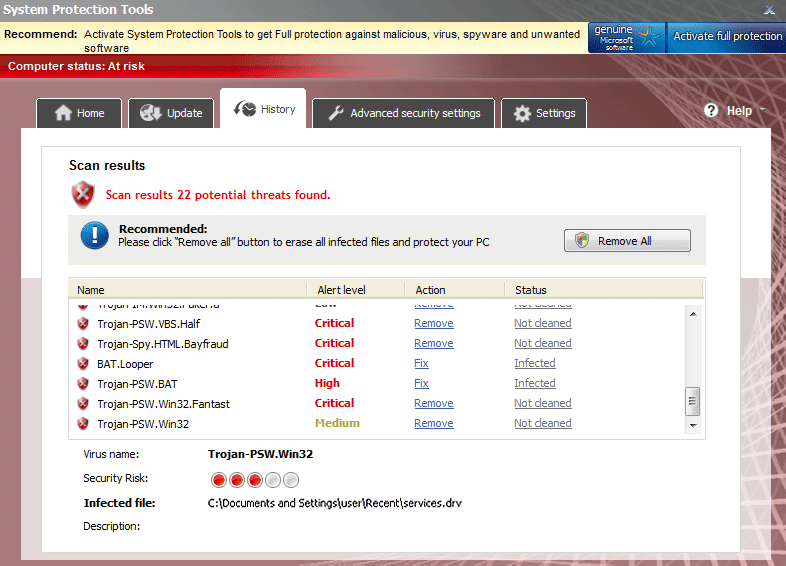 System Protection Tools is a rogue anti-malware scanner that's just a renamed version of previously-distributed types of scamware security programs. System Protection Tools and its ancestors aren't capable of protecting your PC from malware, but what they are capable of doing is providing fake security alerts while they try to steal your money in a software registration process. SpywareRemove.com malware researchers have found a toll-free way of registering System Protection Tools, but this should only be done as the first step towards deleting System Protection Tools from your computer with an actual anti-malware product.
System Protection Tools Has All the Tools It Needs... to Steal Your Money
As a rip-off of other types of fake anti-malware scanners from the FakeVimes, System Protection Tools is both derivative and generally worthless for protecting your PC from the threats that System Protection Tools claims to detect and remove. Some of the most prolific symptoms of a System Protection Tools infection include fake pop-up warnings about nonexistent PC threats and system scans that include similar 'cry wolf' detections in their results. SpywareRemove.com malware analysts don't see any reason to pay any heed to System Protection Tools's advice or warnings, since System Protection Tools merely is designed to provide fraudulent security information that makes System Protection Tools look more useful than System Protection Tools actually is as a faux security product.
Like other rogue anti-malware applications, System Protection Tools is built to steal your money by forcing you to register its software, but there's no need to register System Protection Tools to delete System Protection Tools from your PC, provided that you can access Safe Mode to disable System Protection Tools's startup routine. Nonetheless, if you want to register System Protection Tools for free before trying to delete System Protection Tools, SpywareRemove.com malware experts have found the codes 'U2FD-S2LA-H4KA-UEPB' and 'K7LY-R5GU-SI9D-EVFB' to be effective for System Protection Tools's family of scamware. Some examples of System Protection Tool family members are Privacy Guard Pro, Extra Antivirus, Fast Antivirus 2009, Presto TuneUp, Windows Security Suite, Smart Virus Eliminator, Packed.Generic.245, Volcano Security Suite, Windows Enterprise Suite, Enterprise Suite, Additional Guard, Live PC Care, PC Live Guard, Live Enterprise Suite, Security Antivirus, My Security Wall, CleanUp Antivirus, Smart Security and PrivacyGuard Pro 2.0.
How to Save Yourself from a Probing by System Protection Tools's Questionable Tool Chest
System Protection Tools and its clones are often distributed by malicious sites that fraudulently promote such scamware as being legitimate security products, with examples of such sites including secure1.personalsuiteydpz.com and www5.av-security-essentials.com. SpywareRemove.com malware researchers suggest that you use both anti-malware products and strong browser safety protocols (such as keeping your browser updated and disabling unnecessary script-based features) to protect your computer from accidental exposure to System Protection Tools through these sites. System Protection Tools and similar PC threats are often used as a payload for various Trojans (such as Zlob) that are installed onto your PC without your permission.
Because rogue security software like System Protection Tools is often complicit in browser redirect attacks or attempts to block genuine security programs, you should be prepared to disable System Protection Tools by any means that are necessary if you can't delete System Protection Tools in an initial system scan. Windows features like Safe Mode and even more extreme measures than that, such as booting your OS from a removable drive, have been dubbed effective by SpywareRemove.com malware researchers when it comes to shutting System Protection Tools down.
Technical Details
File System Modifications
Tutorials: If you wish to learn how to remove malware components manually, you can read the tutorials on how to find malware, kill unwanted processes, remove malicious DLLs and delete other harmful files. Always be sure to back up your PC before making any changes.
The following files were created in the system:%AllUsersProfile\%Application Data\[RANDOM CHARACTERS][RANDOM CHARACTERS]
File name: %AllUsersProfile\%Application Data\[RANDOM CHARACTERS][RANDOM CHARACTERS]Group: Malware file
%AppData%\System Protection Tools
File name: %AppData%\System Protection ToolsGroup: Malware file
%AppData%\Microsoft\Internet Explorer\Quick Launch\System Protection Tools.lnk
File name: %AppData%\Microsoft\Internet Explorer\Quick Launch\System Protection Tools.lnkFile type: Shortcut
Mime Type: unknown/lnk
Group: Malware file
%UserProfile%\Start Menu\Programs\System Protection Tools.lnk
File name: %UserProfile%\Start Menu\Programs\System Protection Tools.lnkFile type: Shortcut
Mime Type: unknown/lnk
Group: Malware file
%UserProfile\%Start Menu\System Protection Tools
File name: %UserProfile\%Start Menu\System Protection ToolsGroup: Malware file
%UserProfile\%Desktop\System Protection Tools
File name: %UserProfile\%Desktop\System Protection ToolsGroup: Malware file
Registry Modifications
CLSID{3F2BBC05-40DF-11D2-9455-00104BC936FF}HKEY..\..\{Value}HKEY_CURRENT_USER\Software\Microsoft\Windows\CurrentVersion\Run Best Antivirus Software = "%AllUsersProfile%Application Data[RANDOM CHARACTERS][RANDOM CHARACTERS].exe" /s /dHKEY_CURRENT_USER\Software\Microsoft\Windows\CurrentVersion\Policies\Explorer\Disallow\Run = 01000000HKEY_LOCAL_MACHINE\Software\microsoft\Windows NT\CurrentVersion\Image File Execution Options[RANDOM CHARACTERS].exeDebugger = svchost.exeHKEY..\..\..\..{Subkeys}HKEY_CURRENT_USER\Software\Microsoft\Windows\CurrentVersion\Policies\Explorer\Disallow\Run [1...15]
Additional Information
| # | Message |
|---|---|
| 1 | System alert Suspicious software which may be dangerous has been detected on your PC. Click here to remove this threat immediately using System Protection Tools. |
| 2 | System alert System Protection Tools has detected potentially harmful software in your system. It is strongly recommended that you register System Protection Tools to remove all found threats immediately. |
| 3 | System warning No real-time malware, spyware and virus protection was found. Click here to activate. |
| 4 | Warning Warning! Virus detected |
| 5 | Warning! Identity theft attempt detected Hidden connection IP: 128.154.26.11 Target: Microsoft Corporation keys |
please remove this from my computer I already have protection
in task manager u can kill any process starting with bc##ect quickly as it apears this will keep it from installing then find program in your files and delete it then u can run your cleaners