iPumper Toolbar
Posted: October 2, 2013
Threat Metric
The following fields listed on the Threat Meter containing a specific value, are explained in detail below:
Threat Level: The threat level scale goes from 1 to 10 where 10 is the highest level of severity and 1 is the lowest level of severity. Each specific level is relative to the threat's consistent assessed behaviors collected from SpyHunter's risk assessment model.
Detection Count: The collective number of confirmed and suspected cases of a particular malware threat. The detection count is calculated from infected PCs retrieved from diagnostic and scan log reports generated by SpyHunter.
Volume Count: Similar to the detection count, the Volume Count is specifically based on the number of confirmed and suspected threats infecting systems on a daily basis. High volume counts usually represent a popular threat but may or may not have infected a large number of systems. High detection count threats could lay dormant and have a low volume count. Criteria for Volume Count is relative to a daily detection count.
Trend Path: The Trend Path, utilizing an up arrow, down arrow or equal symbol, represents the level of recent movement of a particular threat. Up arrows represent an increase, down arrows represent a decline and the equal symbol represent no change to a threat's recent movement.
% Impact (Last 7 Days): This demonstrates a 7-day period change in the frequency of a malware threat infecting PCs. The percentage impact correlates directly to the current Trend Path to determine a rise or decline in the percentage.
| Ranking: | 19,484 |
|---|---|
| Threat Level: | 1/10 |
| Infected PCs: | 4,089 |
| First Seen: | October 2, 2013 |
|---|---|
| Last Seen: | February 8, 2025 |
| OS(es) Affected: | Windows |
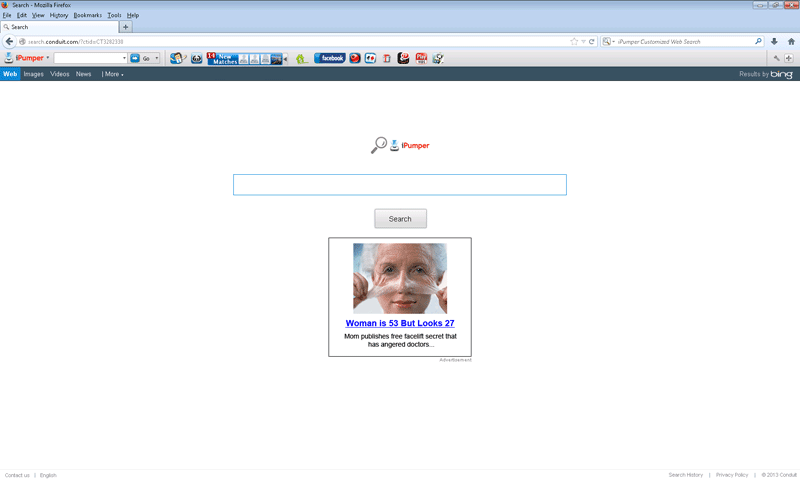 The iPumper Toolbar is a browser add-on that promotes the Conduit.com site's search features by modifying your browser to redirect to that site. Although Conduit.com isn't an immediate danger to your site, its search results aren't always optimally relevant, and malware experts usually suggest that you uninstall the iPumper Toolbar and other Conduit-affiliated toolbars, which are officially classified as Potentially Unwanted Programs and browser hijackers. Since the iPumper Toolbar PUP often is installed along with other programs that are historically difficult to uninstall, anti-malware applications generally should be used for deleting the iPumper Toolbar and making sure that all browser changes associated with the iPumper Toolbar have been reverted.
What iPumper Pumps into Your Browser Besides File Downloads
The iPumper Toolbar usually isn't installed by itself and tends to be installed only with iPumper, a download manager copied from previous products like Fast File Downloader. Besides having a questionable history for fulfilling its functions as a download assistant, iPumper also often is installed without your permission, along with the iPumper Toolbar, whose purpose is to make self-serving changes to your Web browser.
Changes enacted by the iPumper Toolbar are similar to those of other Conduit-affiliated browsers, and usually include:
- Locking your homepage to Conduit.com.
- Redirecting your online searches to Conduit.com.
The iPumper Toolbar and its related iPumper download manager may resist any uninstallation attempts by exploiting admin account settings to prevent non-administrator accounts from removing them. PC users who actually have access to their admin accounts tend to find that the iPumper Toolbar and its comrade-in-arms simply will not display in the Control Panel's list of installed programs. The iPumper Toolbar can't be disabled through your normal Web browser's add-on-managing settings.
Cleaning the Pipes of Your Browser of an iPumper Toolbar Clog
Like a standard PUP, the iPumper Toolbar doesn't do anything more harmful than take your browser to places you probably don't want to visit, but SpywareRemove.com malware experts still recommend uninstalling the iPumper Toolbar for the sake of your browser's safety – especially in light of iPumper's own risky traits that make its value as a download manager extremely questionable. To overcome the exploits being used to keep iPumper-brand software on your computer against your will, anti-malware applications generally should be trusted for deleting an iPumper Toolbar and its fellows.
The iPumper Toolbar may be partnered with an exceptionally stubborn program, but the iPumper Toolbar also is far from being a unique snowflake of a toolbar. SpywareRemove.com malware experts have seen a long line of toolbars that redirect their victims to Conduit.com just like the iPumper Toolbar, with some foremost examples including the MakeMeBabies Toolbar, the MySavings Toolbar, the Mini001 Toolbar, the Top 10 Toolbar, the Goofler Toolbar and the Trustworthy Toolbar.
Technical Details
File System Modifications
Tutorials: If you wish to learn how to remove malware components manually, you can read the tutorials on how to find malware, kill unwanted processes, remove malicious DLLs and delete other harmful files. Always be sure to back up your PC before making any changes.
The following files were created in the system:C:\Users\<username>\AppData\Roaming\iPumper\Updater.exe
File name: Updater.exeSize: 16.25 KB (16256 bytes)
MD5: f522bc729222f08a3e530383f41ec676
Detection count: 68
File type: Executable File
Mime Type: unknown/exe
Path: C:\Users\<username>\AppData\Roaming\iPumper\Updater.exe
Group: Malware file
Last Updated: December 29, 2021
C:\!!! DESKTOP XP\DIRECTORIES\Music\iPumper.exe
File name: iPumper.exeSize: 581.86 KB (581864 bytes)
MD5: 4dcb97c728ee20688b75d183acdb4fe4
Detection count: 14
File type: Executable File
Mime Type: unknown/exe
Path: C:\!!! DESKTOP XP\DIRECTORIES\Music\iPumper.exe
Group: Malware file
Last Updated: September 25, 2024
%APPDATA%\iPumper\ipumperinst.exe
File name: ipumperinst.exeSize: 4.88 MB (4886472 bytes)
MD5: 61dae3070a186450cf237aa6831241dd
Detection count: 9
File type: Executable File
Mime Type: unknown/exe
Path: %APPDATA%\iPumper
Group: Malware file
Last Updated: January 28, 2014
More files
Registry Modifications
File name without pathiPumper.lnkPileFile.lnkRegexp file mask%windir%\system32\tasks\escoladeHKEY..\..\..\..{RegistryKeys}Software\Informer Technologies, Inc.\UniKeeperSOFTWARE\Mozilla\Firefox\Extensions\ntfdsaftsfdfdxx@mozilla.orgSOFTWARE\Wow6432Node\Mozilla\Firefox\Extensions\ntfdsaftsfdfdxx@mozilla.orgHKEY_LOCAL_MACHINE\Software\[APPLICATION]\Microsoft\Windows\CurrentVersion\Uninstall..{Uninstaller}{A0099012-E037-4DEF-A539-2E02F0DC7446}_is1{E2AF26F0-6DCC-410c-A24D-ED093DDE1638}
Leave a Reply
Please note that we are not able to assist with billing and support issues regarding SpyHunter or other products. If you're having issues with SpyHunter, please get in touch with SpyHunter customer support through your SpyHunter . If you have SpyHunter billing questions, we recommend you check the Billing FAQ. For general suggestions or feedback, contact us.