Antivirus 2008 XP
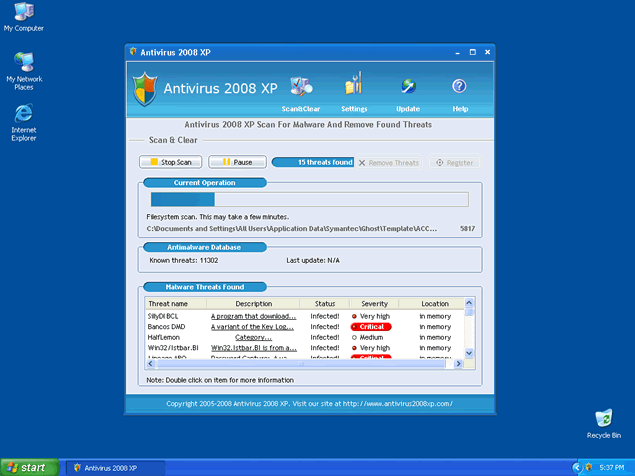 Antivirus 2008 XP, or Antivirus2008XP, is a rogue anti-spyware application. Antivirus 2008 XP is often downloaded and installed by a Trojan, through browser security holes, or via other unconventional and unethical mechanisms. Antivirus 2008 XP is
usually promoted via a Zlob Codec installer found on adult websites. Antivirus 2008 XP may pop up notifications of imaginary security and privacy risks in an attempt to get the user to purchase the full version. Antivirus 2008 XP may generate system slowdown and instability. Antivirus 2008 XP may prove difficult to manually remove. Antivirus 2008 XP has the ability to recreate itself after reboot and its "System scan" messages may continue pop up on your task manager. Other Antivirus 2008 XP aliases that have recently appeared on the Web are: XP Antivirus 2008, Antivirus 2008, Antivirus 2009, Vista Antivirus 2008, Ultimate Antivirus 2008 and System Antivirus 2008.
File System Modifications
- The following files were created in the system:
# File Name 1 %profile%\application data\secure solutions\antispyware 2008 xp\as2008xp.exe 2 as2008xp.exe 3 setup_100527_3_.exe
Registry Modifications
- The following newly produced Registry Values are:
HKEY..\..\..\..{Subkeys}HKEY_CURRENT_USER\software\secure solutions\antispyware 2008 xp lgidHKEY_CURRENT_USER\software\secure solutions\antispyware 2008 xp lidHKEY_CURRENT_USER\software\secure solutions\antispyware 2008 xp pidHKEY_CURRENT_USER\software\secure solutions\antispyware 2008 xp\2.1 installtimeHKEY_CURRENT_USER\software\secure solutions\antispyware 2008 xp\2.1 start counterHKEY_CURRENT_USER\software\secure solutions\antispyware 2008 xp\2.1\config
I have the same problem as the comment above, I have windows xp and cannot get rid of the warning label and the blue background stays white. What is the procedure to return to normal blue background on the desktop icon page without the warning label
Antivius 2008 loaded on my computer and I removed all but the warning label on my desktop icon page and the page is white instead of blue, how to I fix it?
s***! my comp wont let me get rid of anti virus, are there any solutions that dont have the risk of deleting my comp, and no downloads please, i dont trust them anymore(you never know)