BarDiscover.com
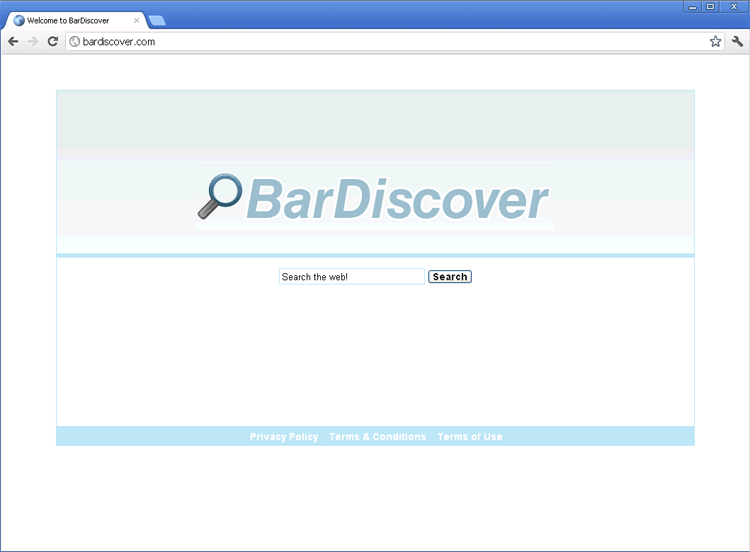 BarDiscover.com is a clone of other fake search engines from the same family, which are all readily identifiable due to shared blue template and interface (which includes a fake privacy policy and other false guarantees of your safety). Even though BarDiscover.com looks like a search engine, BarDiscover.com's real capabilities are focused on attacking your PC with drive-by-downloads and propagation of hostile software, potentially including browser hijackers, Trojans and other PC threats. SpywareRemove.com malware analysts strongly discourage any contact with BarDiscover.com or sites that are associated with BarDiscover.com, and recommend that you use anti-malware software if you notice browser redirects to BarDiscover.com or other symptoms of BarDiscover.com-associated attacks.
BarDiscover.com – the Last Thing You Want to Use to Find Your Next Drinking Dive
Despite the implications in its name, BarDiscover.com isn't a good search engine for finding links to drinking establishments or, in fact, anything else on the web. As a fraudulent search engine that lacks genuine searching functions or safety features, BarDiscover.com doesn't care about your search queries or the safety of your computer – in fact, visits to BarDiscover.com will endanger your PC with direct attacks that exploit browser-based vulnerabilities. These attacks, confirmed as drive-by-downloads, can be used to redirect you to other hostile sites or install PC threats onto your computer automatically. Other than warnings that may be triggered by your security software, these attacks may not leave visible symptoms for you to detect.
SpywareRemove.com malware researchers speak highly of computer users taking the following precautions to minimize the potential damage that contact with BarDiscover.com can cause to your PC:
- Keep anti-malware software on your PC to detect and deflect attacks from malicious sites like BarDiscover.com.
- Keep your browser updated to reduce the availability of security flaws for BarDiscover.com to exploit.
- By default, keep exploitable scripts, such as Flash and Java disabled, and selectively enable them for websites that you trust. Just as with your web browser, keeping these script packages updated will also reduce potential security exploits.
- Scan your computer after any visit to BarDiscover.com to detect potential drive-by-downloaded software on your computer, even if you don't interact with BarDiscover.com in any significant way.
What Awaits Your PC if You Had a Taste of BarDiscover.com's Toxic Search Results
SpywareRemove.com malware experts also caution that risks pertaining to BarDiscover.com should also be considered identical for clones of BarDiscover.com, which can be easily identified, since they use the same layout as BarDiscover.com with different URLs slapped on top. Some other members of BarDiscover.com's family of fake search sites include Browserseek.com, Browserzinc.com, Zinkwink.com, BrowserQuery.com, BarQuery.com, Seekdns.com, TabQuery.com, Zwankysearch.com and WinkZink.com, many of which have already been blacklisted by a variety of PC security companies.
Because BarDiscover.com's drive-by-downloads have been noted for contacting other malicious sites and may not have a strictly-defined payload, you should be prepared for the possibility of a range of different PC threats after any contact with BarDiscover.com, although PC threats that contain browser-redirecting capabilities are especially probable hazards. Some common types of hostile software that SpywareRemove.com malware experts note as being likely from BarDiscover.com-related attacks include:
- Browser hijackers that redirect your browser to BarDiscover.com without your consent, especially after any attempt to use a different (and reputable) search engine. Related attacks may block safe websites, change your homepage to BarDiscover.com or create browser pop-ups.
- Rogue security programs that create fake alerts and other types of fraudulent security features to encourage you to spend money on their software.
- Spyware programs that steal personal information – particularly information that's linked to online bank accounts and other security-related data.
Technical Details
File System Modifications
Tutorials: If you wish to learn how to remove malware components manually, you can read the tutorials on how to find malware, kill unwanted processes, remove malicious DLLs and delete other harmful files. Always be sure to back up your PC before making any changes.
The following files were created in the system:%AppData%[trojan name]toolbarstat.log
File name: %AppData%[trojan name]toolbarstat.logMime Type: unknown/log
%AppData%[trojan name]toolbardtx.ini
File name: %AppData%[trojan name]toolbardtx.iniMime Type: unknown/ini
%AppData%[trojan name]toolbarlog.txt
File name: %AppData%[trojan name]toolbarlog.txtMime Type: unknown/txt
%AppData%[trojan name]toolbarpreferences.dat
File name: %AppData%[trojan name]toolbarpreferences.datFile type: Data file
Mime Type: unknown/dat
%AppData%[trojan name]toolbarguid.dat
File name: %AppData%[trojan name]toolbarguid.datFile type: Data file
Mime Type: unknown/dat
%AppData%[trojan name]toolbarstats.dat
File name: %AppData%[trojan name]toolbarstats.datFile type: Data file
Mime Type: unknown/dat
%AppData%[trojan name]toolbaruninstallIE.dat
File name: %AppData%[trojan name]toolbaruninstallIE.datFile type: Data file
Mime Type: unknown/dat
%AppData%[trojan name]toolbaruninstallStatIE.dat
File name: %AppData%[trojan name]toolbaruninstallStatIE.datFile type: Data file
Mime Type: unknown/dat
%Temp%[trojan name]toolbar-manifest.xml
File name: %Temp%[trojan name]toolbar-manifest.xmlMime Type: unknown/xml
%AppData%[trojan name]toolbarversion.xml
File name: %AppData%[trojan name]toolbarversion.xmlMime Type: unknown/xml
%AppData%[trojan name]toolbarcouponscategories.xml
File name: %AppData%[trojan name]toolbarcouponscategories.xmlMime Type: unknown/xml
%AppData%[trojan name]toolbarcouponsmerchants.xml
File name: %AppData%[trojan name]toolbarcouponsmerchants.xmlMime Type: unknown/xml
%AppData%[trojan name]toolbarcouponsmerchants2.xml
File name: %AppData%[trojan name]toolbarcouponsmerchants2.xmlMime Type: unknown/xml
Registry Modifications
HKEY..\..\{CLSID Path}HKEY_LOCAL_MACHINE\SOFTWARE\Classes\CLSID\{A40DC6C5-79D0-4ca8-A185-8FF989AF1115}ProgID "[trojan name]IEHelper.UrlHelper.1"HKEY_LOCAL_MACHINE\SOFTWARE\Classes\CLSID\{A40DC6C5-79D0-4ca8-A185-8FF989AF1115} "UrlHelper Class"HKEY_LOCAL_MACHINE\SOFTWARE\Classes\CLSID\{99079a25-328f-4bd4-be04-00955acaa0a7}InprocServer32 "C:PROGRA~1WINDOW~4ToolBar[trojan name]dtx.dll"HKEY_LOCAL_MACHINE\SOFTWARE\Classes\CLSID\{99079a25-328f-4bd4-be04-00955acaa0a7} "[trojan name] Toolbar"HKEY_LOCAL_MACHINE\SOFTWARE\Classes\CLSID\{A40DC6C5-79D0-4ca8-A185-8FF989AF1115}VersionIndependentProgID "[trojan name]IEHelper.UrlHelper"HKEY_LOCAL_MACHINE\SOFTWARE\Microsoft\Windows\CurrentVersion\Explorer\Browser Helper Objects{99079a25-328f-4bd4-be04-00955acaa0a7} "[trojan name] Toolbar"HKEY..\..\..\..{Subkeys}HKEY_LOCAL_MACHINE\SOFTWARE\Classes[trojan name]IEHelper.DNSGuardHKEY_LOCAL_MACHINE\SOFTWARE\Classes[trojan name]IEHelper.DNSGuard.1HKEY_LOCAL_MACHINE\SOFTWARE\Classes[trojan name]IEHelper.DNSGuardCurVerHKEY_LOCAL_MACHINE\SOFTWARE\Classes[trojan name]IEHelper.DNSGuardCLSIDHKEY_LOCAL_MACHINE\SOFTWARE\Microsoft\Internet Explorer\Toolbar "[trojan name] Toolbar"
Leave a Reply
Please note that we are not able to assist with billing and support issues regarding SpyHunter or other products. If you're having issues with SpyHunter, please get in touch with SpyHunter customer support through your SpyHunter . If you have SpyHunter billing questions, we recommend you check the Billing FAQ. For general suggestions or feedback, contact us.