Win 7 Security 2013
Posted: October 15, 2012
Threat Metric
The following fields listed on the Threat Meter containing a specific value, are explained in detail below:
Threat Level: The threat level scale goes from 1 to 10 where 10 is the highest level of severity and 1 is the lowest level of severity. Each specific level is relative to the threat's consistent assessed behaviors collected from SpyHunter's risk assessment model.
Detection Count: The collective number of confirmed and suspected cases of a particular malware threat. The detection count is calculated from infected PCs retrieved from diagnostic and scan log reports generated by SpyHunter.
Volume Count: Similar to the detection count, the Volume Count is specifically based on the number of confirmed and suspected threats infecting systems on a daily basis. High volume counts usually represent a popular threat but may or may not have infected a large number of systems. High detection count threats could lay dormant and have a low volume count. Criteria for Volume Count is relative to a daily detection count.
Trend Path: The Trend Path, utilizing an up arrow, down arrow or equal symbol, represents the level of recent movement of a particular threat. Up arrows represent an increase, down arrows represent a decline and the equal symbol represent no change to a threat's recent movement.
% Impact (Last 7 Days): This demonstrates a 7-day period change in the frequency of a malware threat infecting PCs. The percentage impact correlates directly to the current Trend Path to determine a rise or decline in the percentage.
| Threat Level: | 2/10 |
|---|---|
| Infected PCs: | 3,982 |
| First Seen: | October 15, 2012 |
|---|---|
| Last Seen: | August 12, 2024 |
| OS(es) Affected: | Windows |
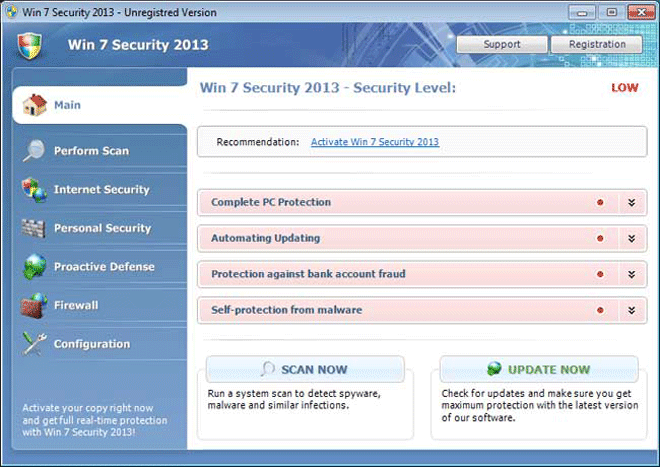 One of the most recent examples of FakeRean's ever-expanding roster of scamware, Win 7 Security 2013 is a fake anti-malware scanner that displays intentionally inaccurate information to make your PC look as though it's threatened by dozens of attackers. Win 7 Security 2013 is incapable of detecting or removing real malware infections, although Win 7 Security 2013's pop-up alerts and scans will persist in stating that you should purchase Win 7 Security 2013 to disinfect your computer. Since Win 7 Security 2013 may block wide ranges of other programs or disable features that are important for the safe maintenance of Windows, SpywareRemove.com malware researchers also consider Win 7 Security 2013 a potentially high security risk. Disabling and then deleting Win 7 Security 2013, through methods described further in this article, should be considered the default solution to Win 7 Security 2013-related attacks and attacks by other FakeRean-based scamware.
New Malware Every Minute Under Win 7 Security 2013's 'Security' Reign
Win 7 Security 2013, like other rogue security programs from the FakeRean family, can't distribute itself but may be installed by other types of malware or by websites that host exploits (such as Blacole). Recent delivery methods for Win 7 Security 2013 and related PC threats include spam e-mail and other social engineered attacks that rely on tricking the victim into installing Win 7 Security 2013 willingly. Trojans used to install Win 7 Security 2013 also may present Win 7 Security 2013 as some form of beneficial security software, although SpywareRemove.com malware analysts have found that the truth is very far from that.
Win 7 Security 2013 displays itself as an anti-malware scanner, but Win 7 Security 2013's scans are simple simulations that detect fake threats. Fake PC threats that are 'detected' by Win 7 Security 2013 are identified by technical names and include an emphasize on high-level threats like keyloggers or rootkits, which may make PC users panic and consider spending money on Win 7 Security 2013 before considering the consequences.
SpywareRemove.com malware research team also has seen many types of fraudulent system alerts from Win 7 Security 2013 and other members of its family. Usually, these alerts imitate the appearance of normal system pop-up errors including taskbar notifications and warnings from Windows. They should, of course, be disregarded, since attempting to delete files that Win 7 Security 2013 claims are infected just damages uninfected programs that don't have anything to do with any other problems on your computer. Likewise, any expenditure on Win 7 Security 2013's worthless registration should be avoided.
Win 7 Security 2013: the Security Downgrade that Hits Hard
Win 7 Security 2013 also has shown some traits that are usual for recent members of FakeRean like Antivirus 2008 Pro, Windows Antivirus 2008, Vista Antivirus 2008, Antivirus XP 2008, PC Clean Pro, Antivirus Pro 2009, AntiSpy Safeguard, ThinkPoint, Spyware Protection 2010, Internet Antivirus 2011, Palladium Pro, XP Anti-Virus 2011, CleanThis, Rogue.Vista Antivirus 2008, XP Home Security 2012, XP Security 2012 and AntiVirus PRO 2015. Attacks from Win 7 Security 2013 that SpywareRemove.com malware experts have noted for their danger include:
- Launching Win 7 Security 2013 after you try to use any other program. This attack uses a Registry exploit that allows Win 7 Security 2013 to block any program and, in most cases, display a fake infection alert.
- Recorded web-browsing activity in all popular brands of browsers. Win 7 Security 2013 may accompany this by attempts to redirect your browser to fake error pages if you try to access a site that it deems unacceptable (such as a PC security website).
- Deleted Windows programs that can include:
- Windows Firewall
- Windows Defender
- Windows Update
- Windows Security Center
Disabling Win 7 Security 2013 with Safe Mode or a boot from a USB drive, whichever is necessary, is the initial step in removing Win 7 Security 2013. SpywareRemove.com malware analysts suggest using anti-malware software to delete Win 7 Security 2013 once Win 7 Security 2013 is disabled, after which any lingering changes to your computer can be reversed.
Technical Details
File System Modifications
Tutorials: If you wish to learn how to remove malware components manually, you can read the tutorials on how to find malware, kill unwanted processes, remove malicious DLLs and delete other harmful files. Always be sure to back up your PC before making any changes.
The following files were created in the system:%Temp%\[RANDOM CHARACTERS].exe
File name: %Temp%\[RANDOM CHARACTERS].exeFile type: Executable File
Mime Type: unknown/exe
Group: Malware file
%LocalAppData%\[RANDOM CHARACTERS].exe
File name: %LocalAppData%\[RANDOM CHARACTERS].exeFile type: Executable File
Mime Type: unknown/exe
Group: Malware file
%CommonAppData%\[RANDOM CHARACTERS].exe
File name: %CommonAppData%\[RANDOM CHARACTERS].exeFile type: Executable File
Mime Type: unknown/exe
Group: Malware file
%AppData%\Roaming\Microsoft\Windows\Templates\[RANDOM CHARACTERS].exe
File name: %AppData%\Roaming\Microsoft\Windows\Templates\[RANDOM CHARACTERS].exeFile type: Executable File
Mime Type: unknown/exe
Group: Malware file
Registry Modifications
HKEY..\..\{Value}HKEY_CURRENT_USER\Software\Microsoft\Windows\CurrentVersion\Internet Settings “WarnOnHTTPSToHTTPRedirect" = 0HKEY_CURRENT_USER\Software\Microsoft\Windows\CurrentVersion\Policies\System “DisableRegedit" = 0HKEY_CURRENT_USER\Software\Microsoft\Windows\CurrentVersion\Policies\System “DisableRegistryTools" = 0HKEY_CURRENT_USER\Software\Microsoft\Windows\CurrentVersion\Policies\System “DisableTaskMgr" = 0HKEY_LOCAL_MACHINE\SOFTWARE\Clients\StartMenuInternet\IEXPLORE.EXE\shell\open\command “(Default)" = '"%LocalAppData%\kdn.exe" -a “C:\Program Files\Internet Explorer\iexplore.exe"'HKEY_CURRENT_USER\Software\Classes\.exe\shell\open\command "(Default)" = "%LocalAppData%\.exe" -a "%1" %*HKEY_CURRENT_USER\Software\Classes\.exe "(Default)" = ''HKEY_CURRENT_USER\Software\Classes\ "(Default)" = 'Application'HKEY_CURRENT_USER\Software\Classes\\shell\open\command "(Default)" = "%LocalAppData%\.exe" -a "%1" %*HKEY_CURRENT_USER\Software\Classes\\DefaultIcon "(Default)" = '%1'HKEY_CLASSES_ROOT\ah\shell\open\command "(Default)" = "%LocalAppData%\.exe" -a "%1" %*HKEY_CLASSES_ROOT\.exe\shell\open\command "(Default)" = "%LocalAppData%\.exe" -a "%1" %*HKEY_LOCAL_MACHINE\SOFTWARE\Clients\StartMenuInternet\FIREFOX.EXE\shell\open\command "(Default)" = ""%LocalAppData%\.exe -a "C:\Program Files\Mozilla Firefox\firefox.exe""HKEY..\..\..\..{Subkeys}HKEY_CLASSES_ROOT\ah\shell\open\command "IsolatedCommand"
Additional Information
| # | Message |
|---|---|
| 1 | Privacy alert! Rogue malware detected in your system. Data leaks and system damage are possible. Click here for a free security scan and spyware deletion. |
| 2 | Security Breach! Beware! Spyware infection was found. Your system security is at risk. Private information may get stolen, and your PC activity may get monitored. Click for and anti-spyware scan. |
| 3 | Severe system damage! Your system security is in danger. Privacy threats detected. Spyware, keyloggers or Trojans may be working in the background right now. Perform an in-depth scan and removal now, click here. |
| 4 | System hijack! System security threat was detected. Viruses and/or spyware may be damaging your system now. Prevent infection and data loss or stealing by running a free security scan. |
| 5 | Threat detected! Security alert! Your computer was found to be infected with privacy-threatening software. Private data may get stolen and systemmay be severe. Recover your PC from the infection right now, perform a security scan. |
Leave a Reply
Please note that we are not able to assist with billing and support issues regarding SpyHunter or other products. If you're having issues with SpyHunter, please get in touch with SpyHunter customer support through your SpyHunter . If you have SpyHunter billing questions, we recommend you check the Billing FAQ. For general suggestions or feedback, contact us.