Vista Antivirus 2013
Posted: October 1, 2012
Threat Metric
The following fields listed on the Threat Meter containing a specific value, are explained in detail below:
Threat Level: The threat level scale goes from 1 to 10 where 10 is the highest level of severity and 1 is the lowest level of severity. Each specific level is relative to the threat's consistent assessed behaviors collected from SpyHunter's risk assessment model.
Detection Count: The collective number of confirmed and suspected cases of a particular malware threat. The detection count is calculated from infected PCs retrieved from diagnostic and scan log reports generated by SpyHunter.
Volume Count: Similar to the detection count, the Volume Count is specifically based on the number of confirmed and suspected threats infecting systems on a daily basis. High volume counts usually represent a popular threat but may or may not have infected a large number of systems. High detection count threats could lay dormant and have a low volume count. Criteria for Volume Count is relative to a daily detection count.
Trend Path: The Trend Path, utilizing an up arrow, down arrow or equal symbol, represents the level of recent movement of a particular threat. Up arrows represent an increase, down arrows represent a decline and the equal symbol represent no change to a threat's recent movement.
% Impact (Last 7 Days): This demonstrates a 7-day period change in the frequency of a malware threat infecting PCs. The percentage impact correlates directly to the current Trend Path to determine a rise or decline in the percentage.
| Ranking: | 1,611 |
|---|---|
| Threat Level: | 2/10 |
| Infected PCs: | 130,417 |
| First Seen: | October 1, 2012 |
|---|---|
| Last Seen: | March 9, 2025 |
| OS(es) Affected: | Windows |
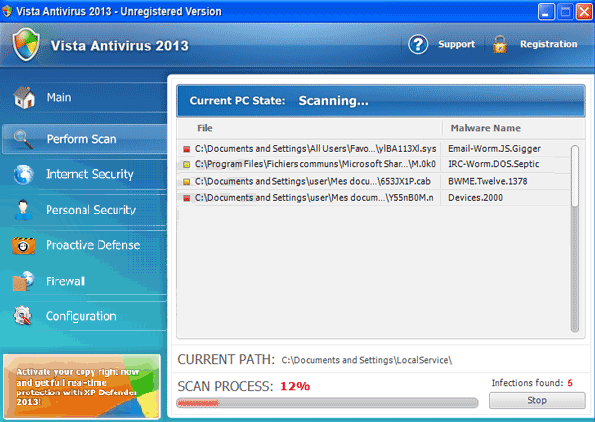 Vista Antivirus 2013 has the looks of an anti-malware program, but as scamware, Vista Antivirus 2013 consistently displays the 'bark' minus the 'bite.'. Because Vista Antivirus 2013 can't detect real malware or remove it from your PC, Vista Antivirus 2013 substitutes fake security information to make itself look useful – even when Vista Antivirus 2013 is not doing anything to help your computer and, in fact, even may be attacking it in other ways. SpywareRemove.com malware research team, above all else, discourages spending money on Vista Antivirus 2013, which rewards its criminal designers to no good end. As malicious software that can have a demonstrably negative impact on your security-related system settings, Vista Antivirus 2013 should be deleted with anti-malware software, just like scamware by any other name.
Vista Antivirus 2013: When the Antivirus is Pretty Close to Being a Virus, Itself
Simple observation places Vista Antivirus 2013 into one of the major and actively-developed branches of the FakeRean family of fake anti-malware scanners. Besides its name, which attempts to enhance its appearance of reputability by linking Vista Antivirus 2013 to a version of Windows, Vista Antivirus 2013 is identical to other members of its family and doesn't have any beneficial security features. Instead of beneficial functions, Vista Antivirus 2013 possesses hostile ones, as SpywareRemove.com malware experts have delineated:
- Vista Antivirus 2013 can launch fraudulent security alerts in several formats, and use all of them to indicate the presence of malicious software or live attacks that aren't actually in existence.
- Vista Antivirus 2013 also includes a faux system-scanning feature that creates lists of imaginary PC threats, including wide ranges of spyware and Trojans that are identified by technical names. This scan is just a simulation; Vista Antivirus 2013 actually doesn't try to scan your hard drive or other areas of your computer.
- SpywareRemove.com malware experts warn that Vista Antivirus 2013 may also block access to other programs or even websites, with blockades including additional fake alerts that falsely-indicate that Vista Antivirus 2013 is protecting you from a threat. For example, Vista Antivirus 2013 may block a web browser and display a pop-up alert that announces that the browser is infected with spyware.
- Vista Antivirus 2013 and other members of its family have also been found to have extreme hostility towards certain Windows programs: Windows Update, Windows Defender and Windows Security Center are some of the most prominent examples.
- Other security settings may also be modified in negative ways (through Registry-based attacks). For instance, Vista Antivirus 2013 may prevent Windows from displaying notifications when changes to your firewall are made.
Finding the Antivirus That Can Punch Vista Antivirus 2013's Ticket
Vista Antivirus 2013 should be removed by anti-malware software as appropriate, particularly since Vista Antivirus 2013 is often accompanied by other PC threats (such as Trojan downloaders that install Vista Antivirus 2013 in the first place). Online attacks that result in Vista Antivirus 2013 infections have been known to use a range of methods, although SpywareRemove.com malware researchers take pains to point out the occurrence of Tibs Trojans and Blacole-based assaults. If desired, you can register Vista Antivirus 2013 with the code 3425-814615-3990 before you try to disable or remove Vista Antivirus 2013.
Members of the same family of scamware as Vista Antivirus 2013 include Antivirus 2008 Pro, Windows Antivirus 2008, Vista Antivirus 2008, Antivirus XP 2008, PC Clean Pro, Antivirus Pro 2009, AntiSpy Safeguard, ThinkPoint, Spyware Protection 2010, Internet Antivirus 2011, Palladium Pro, XP Anti-Virus 2011, CleanThis, Rogue.Vista Antivirus 2008, XP Home Security 2012, XP Security 2012 and AntiVirus PRO 2015. SpywareRemove.com malware researchers stress that all of these rogue security programs should be considered just as hazardous to your computer's health as Vista Antivirus 2013 would be.
Technical Details
File System Modifications
Tutorials: If you wish to learn how to remove malware components manually, you can read the tutorials on how to find malware, kill unwanted processes, remove malicious DLLs and delete other harmful files. Always be sure to back up your PC before making any changes.
The following files were created in the system:%AppData%\[RANDOM 3 LETTERS].exe
File name: %AppData%\[RANDOM 3 LETTERS].exeFile type: Executable File
Mime Type: unknown/exe
Group: Malware file
%Temp%\[RANDOM CHARACTERS].exe
File name: %Temp%\[RANDOM CHARACTERS].exeFile type: Executable File
Mime Type: unknown/exe
Group: Malware file
%LocalAppData%\[RANDOM CHARACTERS].exe
File name: %LocalAppData%\[RANDOM CHARACTERS].exeFile type: Executable File
Mime Type: unknown/exe
Group: Malware file
%CommonAppData%\[RANDOM CHARACTERS].exe
File name: %CommonAppData%\[RANDOM CHARACTERS].exeFile type: Executable File
Mime Type: unknown/exe
Group: Malware file
%AppData%\Roaming\Microsoft\Windows\Templates\[RANDOM CHARACTERS].exe
File name: %AppData%\Roaming\Microsoft\Windows\Templates\[RANDOM CHARACTERS].exeFile type: Executable File
Mime Type: unknown/exe
Group: Malware file
Registry Modifications
HKEY..\..\{Value}HKEY_CURRENT_USER\Software\Classes\.exe\shell\open\command "(Default)" = "%LocalAppData%\.exe" -a "%1" %*HKEY_CURRENT_USER\Software\Classes\.exe "(Default)" = ''HKEY_CURRENT_USER\Software\Classes\ "(Default)" = 'Application'HKEY_CURRENT_USER\Software\Classes\\shell\open\command "(Default)" = "%LocalAppData%\.exe" -a "%1" %*HKEY_CURRENT_USER\Software\Classes\\DefaultIcon "(Default)" = '%1'HKEY_CLASSES_ROOT\ah\shell\open\command "(Default)" = "%LocalAppData%\.exe" -a "%1" %*HKEY_CLASSES_ROOT\.exe\shell\open\command "(Default)" = "%LocalAppData%\.exe" -a "%1" %*HKEY_LOCAL_MACHINE\SOFTWARE\Clients\StartMenuInternet\IEXPLORE.EXE\shell\open\command "(Default)" = ""%LocalAppData%\.exe" -a "C:\Program Files\Internet Explorer\iexplore.exe"" HKEY_LOCAL_MACHINE\SOFTWARE\Clients\StartMenuInternet\FIREFOX.EXE\shell\safemode\command "(Default)" = ""%LocalAppData%\.exe" -a "C:\Program Files\Mozilla Firefox\firefox.exe" -safe-mode"HKEY_LOCAL_MACHINE\SOFTWARE\Clients\StartMenuInternet\FIREFOX.EXE\shell\open\command "(Default)" = ""%LocalAppData%\.exe -a "C:\Program Files\Mozilla Firefox\firefox.exe""HKEY..\..\..\..{Subkeys}HKEY_CLASSES_ROOT\ah\shell\open\command "IsolatedCommand"
Additional Information
| # | Message |
|---|---|
| 1 | Critical System Alert!
Unknown software is try to take control over your system! |
| 2 | Critical System Alert! Unknown software is try to take control over your system! |
| 3 | Malware intrusion!
Sensitive areas of your system ware found to be under attack. Spy software attack or virus infection possible. Prevent further damage or your private data will get stolen. Run an anti-spyware scan now. Click here to start. |
| 4 | Malware intrusion! Sensitive areas of your system ware found to be under attack. Spy software attack or virus infection possible. Prevent further damage or your private data will get stolen. Run an anti-spyware scan now. Click here to start. |
| 5 | Privacy alert! Rogue malware detected in your system. Data leaks and system damage are possible. Click here for a free security scan and spyware deletion. |
| 6 | Privacy threat!
Spyware intrusion detected. Your system is infected. System integrity is at risk. Private data can be stolen by third parties, including credit card details and passwords. Click here to perform a security repair. |
| 7 | Privacy threat! Spyware intrusion detected. Your system is infected. System integrity is at risk. Private data can be stolen by third parties, including credit card details and passwords. Click here to perform a security repair. |
| 8 | System danger! Your system security is in danger. Privacy threats detected. Spyware, keyloggers or Trojans may be working in the background right now. Perform an in-depth scan and removal now, click here. |
| 9 | System hacked! Unknown program is scanning your system registry right now! Identity theft detected! |
| 10 | Virus infection!
System security was found to be compromised. Your computer is now infected. Attention, irreversible system changes may occur. Private data may get stolen. Click here now for an instant anti-virus scan. |
| 11 | Virus infection! System security was found to be compromised. Your computer is now infected. Attention, irreversible system changes may occur. Private data may get stolen. Click here now for an instant anti-virus scan. |
| 12 | Vista Antivirus 2013 Firewall Alert Vista Antivirus 2013 has blocked a program from accessing the internet Internet Explorer is infected with Trojan-BNK.Win32.Keylogger.gen Private data can be stolen by third parties, including credit card details and passwords. |
it will wipe the drive completely and then if you ilnatsl the OS back right then it should work fine but if u r using an older virson of windows like 2000 the drivers might not be found and you have to download a lot of stuff.