XP Security 2013
Posted: October 8, 2012
Threat Metric
The following fields listed on the Threat Meter containing a specific value, are explained in detail below:
Threat Level: The threat level scale goes from 1 to 10 where 10 is the highest level of severity and 1 is the lowest level of severity. Each specific level is relative to the threat's consistent assessed behaviors collected from SpyHunter's risk assessment model.
Detection Count: The collective number of confirmed and suspected cases of a particular malware threat. The detection count is calculated from infected PCs retrieved from diagnostic and scan log reports generated by SpyHunter.
Volume Count: Similar to the detection count, the Volume Count is specifically based on the number of confirmed and suspected threats infecting systems on a daily basis. High volume counts usually represent a popular threat but may or may not have infected a large number of systems. High detection count threats could lay dormant and have a low volume count. Criteria for Volume Count is relative to a daily detection count.
Trend Path: The Trend Path, utilizing an up arrow, down arrow or equal symbol, represents the level of recent movement of a particular threat. Up arrows represent an increase, down arrows represent a decline and the equal symbol represent no change to a threat's recent movement.
% Impact (Last 7 Days): This demonstrates a 7-day period change in the frequency of a malware threat infecting PCs. The percentage impact correlates directly to the current Trend Path to determine a rise or decline in the percentage.
| Threat Level: | 2/10 |
|---|---|
| Infected PCs: | 16 |
| First Seen: | October 8, 2012 |
|---|---|
| OS(es) Affected: | Windows |
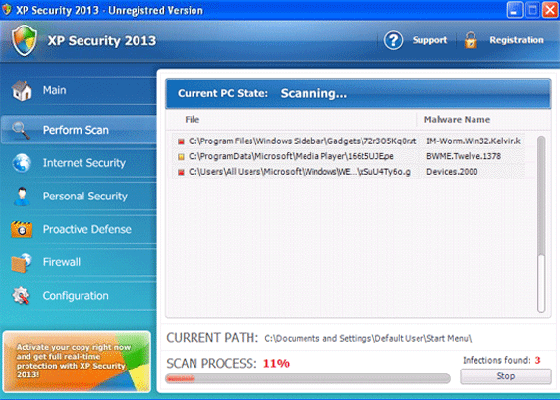 XP Security 2013 is a scamware program that uses the looks of an anti-malware scanner as an excuse to display inaccurate security information through web pages, pop-up warnings and faux system scans. Although XP Security 2013 may pretend to detect high-level threats by their technical names, including spyware like Trojan-BNK.Win32.Keylogger.gen, XP Security 2013 can't detect real infections and doesn't have the ability to delete malicious software. SpywareRemove.com malware researchers recommend deleting XP Security 2013 once you can launch a suitable anti-malware program, not only because XP Security 2013 doesn't have genuine security features but because XP Security 2013 may attack other applications and disable security features that are central to the Windows operating system.
XP Security 2013: the Bad Security That's for More Than Just Windows XP
XP Security 2013 acts like an anti-malware scanner with your best interests at heart, but XP Security 2013's system scans are inaccurate, its pop-up alerts warn you about threats that aren't on your computer and its functional features are all focused on dismantling your computer's built-in security. As a rogue anti-malware product, XP Security 2013 exaggerates the presence of malicious software on your computer as a twisted marketing scheme to get you to spend money on its software. Purchasing XP Security 2013 or even tolerating its existence on your PC for a moment longer than necessary should be considered dangerous to your machine, just like if you were allowing any Trojan or virus to remain intact on your hard drive.
These traits aren't unique to XP Security 2013, which is a clone of similar PC threats from the widely-distributed FakeRean family. FakeRean-based scamware programs may switch their names to match your operating system and often (but not always) use very similar skins and anti-security attacks. SpywareRemove.com malware analysts have identified some of XP Security 2013's closest relatives, including Antivirus 2008 Pro, Antivirus XP 2008, Windows Antivirus 2008, Vista Antivirus 2008, PC Clean Pro, Antivirus Pro 2009, Rogue.Vista Antivirus 2008, AntiSpy Safeguard, ThinkPoint, Spyware Protection 2010, Internet Antivirus 2011, Palladium Pro, XP Anti-Virus 2011, CleanThis, XP Security 2012, XP Home Security 2012 and AntiVirus PRO 2015.
Where the Real Bite in XP Security 2013's Bark Comes into Play
As is generally true for rogue security programs, XP Security 2013 is identified primarily through its fake security pop-up alerts and other attempts to make itself seem like useful software. Nonetheless, SpywareRemove.com malware researchers are even more concerned with XP Security 2013's other attacks, which can disable your computer's security in the process of making it seem like almost every program on your hard drive is infected. These functions can include:
- Programs that are forced to redirect to XP Security 2013 before they launch. XP Security 2013 can then block them and claim that they're infected by keyloggers or other PC threats.
- Browser-redirecting attacks that force your browsers (including Chrome, Internet Explorer and Firefox) to load fake error pages instead of normal websites.
- A range of disabled Windows features, such as the firewall and update system.
Since XP Security 2013 makes changes to sensitive Windows components to accomplish these attacks, SpywareRemove.com malware research team recommends using anti-malware software to delete XP Security 2013 and its system changes safely.
Technical Details
File System Modifications
Tutorials: If you wish to learn how to remove malware components manually, you can read the tutorials on how to find malware, kill unwanted processes, remove malicious DLLs and delete other harmful files. Always be sure to back up your PC before making any changes.
The following files were created in the system:%AppData%\Roaming\Microsoft\Windows\Templates\[RANDOM CHARACTERS]
File name: %AppData%\Roaming\Microsoft\Windows\Templates\[RANDOM CHARACTERS]Group: Malware file
%CommonAppData%\[RANDOM CHARACTERS]
File name: %CommonAppData%\[RANDOM CHARACTERS]Group: Malware file
%LocalAppData%\[RANDOM CHARACTERS]
File name: %LocalAppData%\[RANDOM CHARACTERS]Group: Malware file
%LocalAppData%\[RANDOM CHARACTERS].exe
File name: %LocalAppData%\[RANDOM CHARACTERS].exeFile type: Executable File
Mime Type: unknown/exe
Group: Malware file
%Temp%\[RANDOM CHARACTERS]
File name: %Temp%\[RANDOM CHARACTERS]Group: Malware file
Registry Modifications
HKEY..\..\{Value}HKEY_CURRENT_USER\Software\Classes\.exe\shell\open\command "(Default)" = "%LocalAppData%\.exe" -a "%1" %*HKEY_CURRENT_USER\Software\Classes\.exe "(Default)" = ''HKEY_CURRENT_USER\Software\Classes\ "(Default)" = 'Application'HKEY_CURRENT_USER\Software\Classes\\shell\open\command "(Default)" = "%LocalAppData%\.exe" -a "%1" %*HKEY_CURRENT_USER\Software\Classes\\DefaultIcon "(Default)" = '%1'HKEY_CLASSES_ROOT\ah\shell\open\command "(Default)" = "%LocalAppData%\.exe" -a "%1" %*HKEY_CLASSES_ROOT\.exe\shell\open\command "(Default)" = "%LocalAppData%\.exe" -a "%1" %*HKEY_LOCAL_MACHINE\SOFTWARE\Clients\StartMenuInternet\IEXPLORE.EXE\shell\open\command "(Default)" = ""%LocalAppData%\.exe" -a "C:\Program Files\Internet Explorer\iexplore.exe""HKEY_LOCAL_MACHINE\SOFTWARE\Clients\StartMenuInternet\FIREFOX.EXE\shell\safemode\command "(Default)" = ""%LocalAppData%\.exe" -a "C:\Program Files\Mozilla Firefox\firefox.exe" -safe-mode"HKEY_LOCAL_MACHINE\SOFTWARE\Clients\StartMenuInternet\FIREFOX.EXE\shell\open\command "(Default)" = ""%LocalAppData%\.exe -a "C:\Program Files\Mozilla Firefox\firefox.exe""HKEY..\..\..\..{Subkeys}HKEY_CLASSES_ROOT\ah\shell\open\command "IsolatedCommand"
What is a price of "SpyHunter's malware tool to remove the malware threats" and how can I purchase it?