‘Your computer has been locked!’ Ransomware
Posted: August 31, 2012
Threat Metric
The following fields listed on the Threat Meter containing a specific value, are explained in detail below:
Threat Level: The threat level scale goes from 1 to 10 where 10 is the highest level of severity and 1 is the lowest level of severity. Each specific level is relative to the threat's consistent assessed behaviors collected from SpyHunter's risk assessment model.
Detection Count: The collective number of confirmed and suspected cases of a particular malware threat. The detection count is calculated from infected PCs retrieved from diagnostic and scan log reports generated by SpyHunter.
Volume Count: Similar to the detection count, the Volume Count is specifically based on the number of confirmed and suspected threats infecting systems on a daily basis. High volume counts usually represent a popular threat but may or may not have infected a large number of systems. High detection count threats could lay dormant and have a low volume count. Criteria for Volume Count is relative to a daily detection count.
Trend Path: The Trend Path, utilizing an up arrow, down arrow or equal symbol, represents the level of recent movement of a particular threat. Up arrows represent an increase, down arrows represent a decline and the equal symbol represent no change to a threat's recent movement.
% Impact (Last 7 Days): This demonstrates a 7-day period change in the frequency of a malware threat infecting PCs. The percentage impact correlates directly to the current Trend Path to determine a rise or decline in the percentage.
| Threat Level: | 10/10 |
|---|---|
| Infected PCs: | 40 |
| First Seen: | August 31, 2012 |
|---|---|
| Last Seen: | March 6, 2024 |
| OS(es) Affected: | Windows |
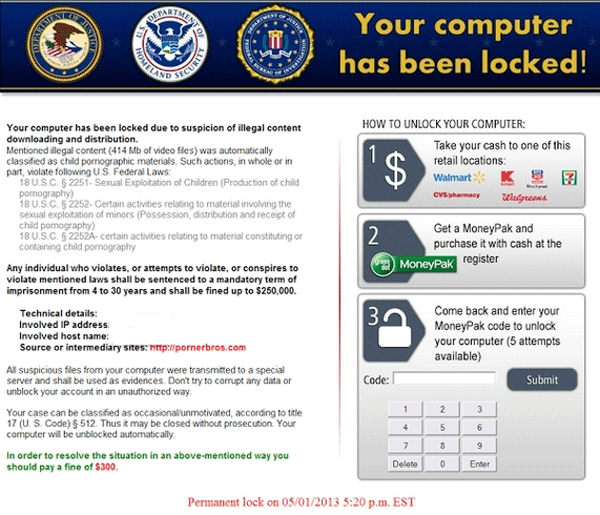
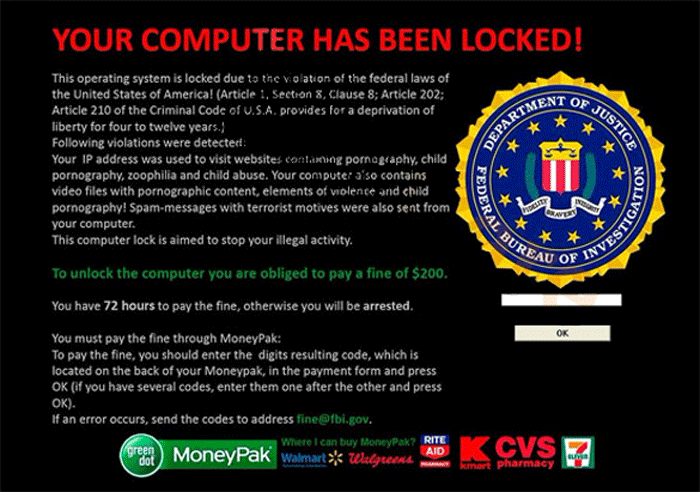 'Your computer has been locked!' Ransomware is a recent variant of 'Ukash Virus' style ransomware Trojans from the Reveton subgroup. In keeping with the scamming philosophy of its relatives, 'Your computer has been locked!' Ransomware presents a pop-up alert that warns you of illegal pornography-related activities linked to your PC as a justification for blocking all programs on your PC. 'Your computer has been locked!' Ransomware claims that it will lift this lockdown once you pay a legal fine, although ESG malware research team recommends that you keep a hold of your money and remove 'Your computer has been locked!' Ransomware's lockdown by deleting the 'Your computer has been locked!' Ransomware with an anti-malware scanner of your preference.
'Your computer has been locked!' Ransomware: the Lock That's Worse Than the Justification for Its Existence
'Your computer has been locked!' Ransomware uses a noticeably different template for its pop-up alert, but this alert still betrays 'Your computer has been locked!' Ransomware's close ties to earlier examples of ransomware Trojans in the text of its warning. With only minor tweaks in phrasing, the 'Your computer has been locked!' Ransomware alert is identical to that of the 'Computer Crime & Intellectual Property Section' Ransomware, itself a clone of PC threats like the Strathclyde Police Ukash Virus, the Scotland Yards Ukash Virus, the Metropolitan Police Ukash Virus, the Bundespolizei Ukash Virus et al.
This telltale pop-up warning informs you that you've been caught committing pornography-related crimes and will have to pay a fine lest you face up to twelve years in prison. ESG malware researchers are quick to point out that there are zero indications of the US government using 'Your computer has been locked!' Ransomware or similar ransomware as a form of law enforcement, and 'Your computer has been locked!' Ransomware, itself, has shown no signs of being linked to any real attempt to detect computer-based pornography crimes.
Even though 'Your computer has been locked!' Ransomware puts you on a three day timer to pay its two hundred dollar fee before the police get involved, ESG malware experts note that there are no consequences to ignoring 'Your computer has been locked!' Ransomware's time limit. This is especially worthy of mentioning given that MoneyPak - 'Your computer has been locked!' Ransomware's preferred method of receiving cash – does not typically offer refunds for fraud-related transactions.
Forcing 'Your computer has been locked!' Ransomware to Break Open Its Bonds
Besides switching its ransom method from Paysafecard to MoneyPak, 'Your computer has been locked!' Ransomware hasn't been found to show any exceptional characteristics compared to other ransomware Trojans from the same family. Therefore, ESG malware experts happily can recommend that you delete 'Your computer has been locked!' Ransomware the same way you'd delete any other type of Ukash Virus-related ransomware Trojan:
- Boot your PC and press F8 before Windows begins to load.
- From the advanced startup menu, select either 'Safe Mode' or 'Safe Mode with Networking' (for Internet/network access) and hit Enter.
- From Safe Mode, launch your choice of anti-malware scanner to detect and remove 'Your computer has been locked!' Ransomware along with any related PC threats.
If Safe Mode fails to disable 'Your computer has been locked!' Ransomware, you may wish to try booting your PC from a removable USB drive to achieve the same end with a flash drive-sized OS.
Technical Details
Additional Information
| # | Message |
|---|---|
| 1 | Your computer has been locked! This operating system is locked due to the violation of the fedefal laws of the United States of America! (Article 1, Section 8, Clause 8; Article 202; Article 210 of the Criminal Code of U.S.A. provides for a deprivation of liberty for four to twelve years.) Following violations were detected: Your IP address was used to visit websites containing pornography, child pornography, zoophilia and child abuse. Your computer also contains video files with pornographic content, elements of violence and child pornography! Spam-messages with terrorist motives were also sent from your computer. Tis computer lock is aimed to stop your illegal activity. To unlock the computer you are obliged to pay a fine of $200. You have 72 hours to pay the fine, otherwise you will be arrested. You must pay the fine through MoneyPak: To pay the fine, you should enter the digits resulting code, which is located on the back of your Moneypak, in the payment form and press OK (if you have several codes, enter them one after the other and press OK). If an error occurs, send the codes to address fine@fbi.gov |
computer locked down and will not allow access